Historically, our GTM AI Podcast & Newsletter on LinkedIn provided you with valuable insights, AI tools, and weekly updates—completely free. After receiving so much feedback and demand for deeper, more advanced content, I’m excited to introduce an upgraded format that offers even more value.
What’s New?
In our free tier, you’ll still get:
1. Podcast In-Depth Notes: Key takeaways and actionable insights from each episode.
2. GTM AI Tool of the Week: In-depth reviews and practical applications.
3. Weekly Research Update: Expert analysis of the latest trends in GTM and AI.
Plus, as a free subscriber, you now have access to:
• Exclusive Discounts: Special offers and free trials for top AI tools and GTM AI Academy course content.
• Bi-Weekly AI Pulse Sessions: Join live discussions with GTM professionals where we cover updates live and collaborate to share insights, ask prompting questions, and network.
Introducing the Paid Tier
For those looking to dive even deeper, we’re launching a premium tier packed with exclusive resources like:
• Advanced AI Prompts and Templates
• In-depth Case Studies and Success Stories
• Video Breakdowns and Exclusive Events
This new structure allows you to choose the level of insights you need to elevate your GTM strategy.
Thank you for being a part of this journey! Let’s continue pushing the boundaries of what AI can do for GTM.
Now with that being said, let’s Dive in to todays newsletter!
We will be diving into a few different prompts and workflows with AI, I will be showing how to do in depth account research in less than 10 min along with some other items from the community all in the paid tier if you want to join in! I give away prompts like candy ;)
Business Impact> Learning Tools
We have the SLACK COMMUNITY around AI , come hang with your fellow GTM professionals, get insights, and content free to help in your teams and roles.
The GTM AI Demo Tools Library is a free resource for you to view AI tools and demos to see what is out there to help your team or to help you in your own workflow
We updated the bi-weekly Collab on Thursdays to now every other Thursday happening next week in the morning and afternoon, if you want to attend, let me know and I will invite you!
Now with all that being said, lets move forward with todays newsletter which is:
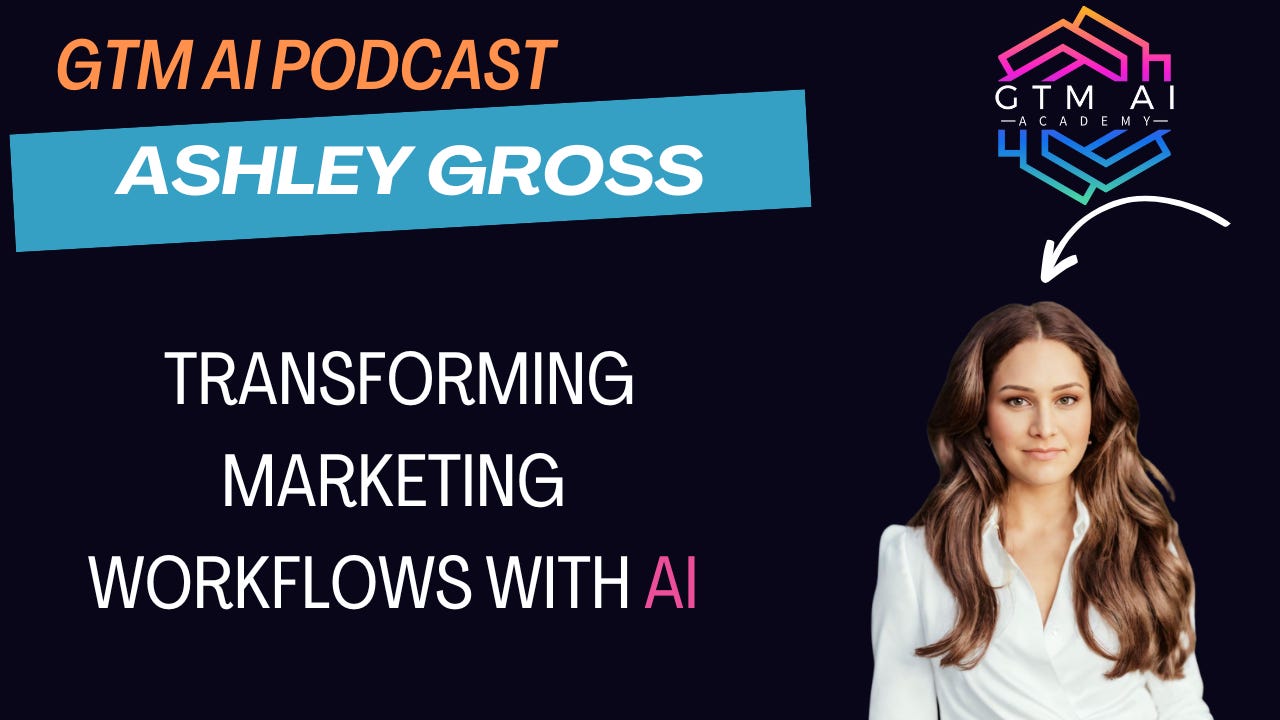
We have #38 GTM AI Podcast with Ashley Gross of AI Workforce Alliance talking about her journey automating marketing workflows and cutting 40 hours to 15 with AI.
You can go to Youtube, Apple, Spotify as well as a whole other host of locations to hear the podcast or see the video interview.
I sat down with Ashley Gross of AI Workforce Alliance an AI strategist who transformed her marketing career by leveraging AI tools to compress a 40-hour workweek into 15 hours. Her journey began with a personal challenge - adapting to motherhood without maternity leave - and evolved into implementing AI solutions across multiple enterprise organizations.
What struck me most was her emphasis on using AI to enhance human work rather than replace it. She shared invaluable insights about creating AI-powered content that doesn't feel robotic, building effective automation workflows, and preparing organizations for AI adoption. The conversation revealed practical approaches to AI implementation that focus on solving real business problems rather than just implementing technology for its own sake.
Key Highlights
Ashley compressed a 40-hour marketing workweek into 15 hours using AI tools like Jasper
Implemented AI solutions across 11 enterprise contracts after success with initial deployment
Emphasizes using AI to enhance transcripts and human content rather than generating content from scratch
Advocates for thorough vetting of AI tools, requiring API capabilities for true automation
Founded AI Workforce Alliance, offering tiered learning paths from free community access to premium consulting
Stresses the importance of aligning AI implementation with clear business problems and executive buy-in
Discusses the evolution of AI agents and their role in workflow optimization
Highlights the need for proper foundational knowledge before implementing advanced AI solutions
Key Quotes from Ashley
On AI Content Creation:
"If you are using AI to create content, you are missing the point of generative AI... I take the transcript, and I feed it into Jasper... These are their experiences from their mouths. I'm just rewording it in a way."
On Technology Integration:
"I'm really loyal to my tech stack... I have a really thorough vetting process and super high expectations because if I'm going to play around or experiment with any type of tool, it needs to be taking at least two of my tools in my tech stack away or solving a problem that hasn't been solved yet."
On Change Management:
"90 percent of AI implementation is communication... These are things that need to be discussed. So it makes me really nervous that there's no slowing, there's no pumping the brakes. We're in this thing."
On Value-Based Work:
"When I work with my clients, I'm getting paid on the outcome that I provide because why would you pay me hourly if I can achieve that outcome in less time? And it's more accurate, right?"
On Learning AI:
"Nobody is an expert in this space and you not asking questions is only hurting you. And I guarantee you when you ask the question, 10 other people had that same question, they just didn't want to ask."
Deep Dive Review: AI Abundance – Insights from Salesforce CEO Marc Benioff
In a recent interview, Salesforce CEO Marc Benioff recently outlined his vision for an era of “AI Abundance.” Benioff described how Salesforce is embedding AI deeply across its products, with the goal of making AI a standard feature of business operations. He emphasized how AI, particularly generative AI (like GPT-4 integrations), can enhance productivity by automating routine tasks, improving customer personalization, and enabling faster decision-making.
Salesforce’s vision goes beyond simple efficiency gains—Benioff believes AI will redefine the role of business technology by providing decision-making support, real-time analytics, and streamlined workflows. He also touched on the ethical considerations, highlighting the importance of responsible and transparent AI use to maintain customer trust and ensure data privacy.
Benioff sees Salesforce’s AI integration as a key driver of customer success, helping businesses use AI to be more efficient and customer-centric. AI’s application spans the company’s entire ecosystem, from customer relationship management to marketing and sales automation, and Benioff believes this comprehensive integration will provide a competitive advantage to businesses willing to embrace it.
Why GTM Professionals Should Pay Attention
GTM professionals must understand the implications of Benioff’s “AI Abundance” vision because it signals a broader shift in how sales, marketing, and customer success operations are conducted.
The message is clear: those who leverage AI effectively can differentiate themselves by delivering hyper-personalized, data-backed experiences at scale.
For sales teams, AI integration means gaining real-time insights into customer behavior, predicting needs, and optimizing outreach strategies.
For marketing, it offers the ability to create personalized campaigns automatically and pivot strategies based on real-time data.
In customer success, AI tools like predictive analytics and chatbots can enhance service by preempting issues and offering proactive solutions.
Adopting these tools not only improves efficiency but also fosters deeper engagement and loyalty from customers. However, simply adopting AI isn’t enough; GTM teams need to master these tools to extract value and use AI insights to elevate every interaction, making the shift toward strategic AI integration a top priority.
While Benioff’s vision is ambitious, it’s essential to consider past criticisms of Salesforce and how these challenges might affect this AI-driven strategy. Salesforce’s extensive suite of features can sometimes lead to complexity and difficulty in adoption for organizations. Users often find it challenging to keep up with frequent updates and new features, creating friction in implementation. This complexity raises the risk of underutilization of advanced AI tools, especially if businesses struggle to integrate them seamlessly into their existing workflows.
This is also not to forget how Salesforce announces releases and then waits forever to get the product actually in your hands.
Another significant concern revolves around data security and privacy. Salesforce’s deeper integration of AI requires handling large amounts of customer data, sparking questions about how secure and transparent these processes will be. AI systems work by processing massive datasets, and when these models are embedded in CRM workflows, there’s a need to balance innovation with strong data governance practices. Maintaining customer trust is vital, and Salesforce must continuously demonstrate its commitment to responsible AI use.
Lastly, the idea of AI abundance raises expectations, but it also requires businesses to have the right skill sets and cultural readiness to leverage AI’s capabilities effectively. A reliance on AI without adequate human oversight can lead to errors or missed opportunities if the model’s outputs are not critically evaluated. Salesforce’s promise hinges on helping organizations not just implement AI but truly understand how to use it for strategic advantage.
Right now from what I am seeing, external tools that have deep Salesforce integrations like Momentum.io are able to make up the gap in legacy tech downfalls.
Final Thoughts
Benioff’s vision of “AI Abundance” sets the stage for a transformative era where AI becomes a fundamental driver of productivity and customer success. GTM professionals should be proactive in mastering these capabilities to stay ahead. At the same time, it’s crucial to approach AI with a balanced perspective, addressing challenges like complexity, data privacy, and user readiness. Salesforce’s success in leading this shift will depend on its ability to navigate these issues and help businesses achieve real, lasting value through AI integration.
Microsoft’s Copilot Studio is unlocking the next generation of AI capabilities by integrating autonomous agents into its platform. This evolution allows companies to create and deploy customized AI agents that can autonomously perform complex workflows, analyze data, and respond to triggers—all while staying aligned with a company’s goals and parameters. The announcement highlights Microsoft’s focus on making AI more intuitive and integrated across business processes, with tools that extend beyond simple automation and enable true autonomy in decision-making.
Why GTM Professionals Should Care
Microsoft’s Copilot Studio is more than a tool—it’s a step toward rethinking operational efficiency and customer engagement strategies. As GTM professionals face increasing demands for personalized interactions and rapid decision-making, the autonomous capabilities of Copilot Studio can serve as a force multiplier. It allows businesses to create agents that execute complex workflows autonomously, freeing up time for high-impact, strategic work. The integration of AI-driven agents signals a shift toward automation beyond traditional rule-based systems, where AI can dynamically respond and adapt to changes in data or customer behavior.
Practical Applications of Copilot Studio’s Autonomous Capabilities
1. Operational Efficiency and Process Automation
Autonomous agents can perform repetitive tasks independently, reducing the need for manual intervention. For example, in sales, agents can automate lead qualification, track sales activities, and update CRM records based on real-time data. This significantly cuts down the time spent on administrative tasks and enables sales reps to focus on engaging customers and closing deals.
2. Proactive Customer Engagement
Copilot Studio’s agents can trigger personalized follow-up actions based on customer activity. If a customer hasn’t interacted with key content or shows signs of dropping off, an AI agent can automatically schedule outreach or provide helpful resources, all based on preset triggers and tailored workflows.
3. Data-Driven Marketing Adjustments
Marketing teams can leverage autonomous agents to run real-time campaigns that adapt based on audience responses. For example, if engagement metrics indicate a need for adjustment, agents can alter targeting criteria or suggest new messaging, enabling campaigns to pivot based on actionable insights and not gut feelings.
4. Advanced Sales Enablement and Real-Time Coaching
Autonomous agents can analyze sales conversations and monitor sales performance continuously, providing real-time coaching suggestions directly to reps during calls. By identifying areas for improvement based on live feedback, the AI helps reps improve their messaging and increase the likelihood of winning deals.
5. Personalized and Dynamic Customer Success Programs
Customer Success teams can use Copilot Studio to automate proactive engagements based on predefined customer health metrics. If a customer’s usage declines or satisfaction scores drop, agents can automatically schedule touchpoints, provide personalized recommendations, or escalate issues to human support staff.
How Different Teams Can Leverage Copilot Studio’s Autonomous Capabilities
1. Sales
• Use Case: Automate CRM tasks, trigger personalized follow-up sequences, and identify high-potential leads based on interaction data.
• In Depth: Sales agents can autonomously perform follow-ups based on preset conditions such as prospects’ inactivity, long response times, or after customer meetings, prompting reps with personalized messages, content, or call-to-action suggestions.
2. Customer Success
• Use Case: Build workflows for continuous monitoring of customer engagement and health, automating personalized interventions to reduce churn.
• In Depth: For example, an agent can analyze customer usage patterns and automatically send customized alerts when a customer’s engagement drops, triggering personalized content delivery or human outreach.
3. Marketing
• Use Case: Segment audiences dynamically, create targeted campaigns based on behavioral data, and automate content adjustments in real-time.
• In Depth: Copilot agents can identify the most responsive segments and generate hyper-specific email sequences or social media posts, automatically refining messaging to resonate with different customer personas.
4. Enablement
• Use Case: Create dynamic training and coaching workflows that adapt based on rep performance and learning speed.
• In Depth: An AI agent can automate training assessments, monitor progress, and provide adaptive learning paths based on rep interactions and areas of struggle, enhancing skill development and reducing the burden on enablement managers.
5. Business Development
• Use Case: Analyze competitive landscapes, identify new market opportunities, and automate outreach to strategic prospects.
• In Depth: By monitoring market trends and customer data, agents can provide proactive suggestions for entering emerging markets or initiating strategic conversations based on growth potential.
6. HR
• Use Case: Automate recruitment processes, gather feedback data, and engage with employees through personalized updates.
• In Depth: AI agents can automatically schedule interviews, send follow-up communications to candidates, and generate feedback reports, streamlining the hiring pipeline and improving candidate engagement.
Why This Matters for GTM Professionals
For GTM professionals, Copilot Studio represents an opportunity to leverage AI at scale and transform the way teams engage with customers and internal stakeholders. It offers a holistic platform to manage autonomous agents tailored to specific tasks, making AI truly actionable. As businesses strive to automate without losing the personal touch, Copilot’s capabilities allow teams to retain strategic oversight while letting AI handle the heavy lifting in operational and tactical roles. This is crucial in a market where speed, efficiency, and precision are key differentiators.
In a landscape increasingly driven by data, automation, and personalized engagement, the integration of autonomous agents into Microsoft’s Copilot Studio empowers GTM professionals to redefine how they achieve and sustain success. By deploying AI at scale, organizations can streamline operations, boost efficiency, and enhance customer experiences without compromising strategic goals or business agility.
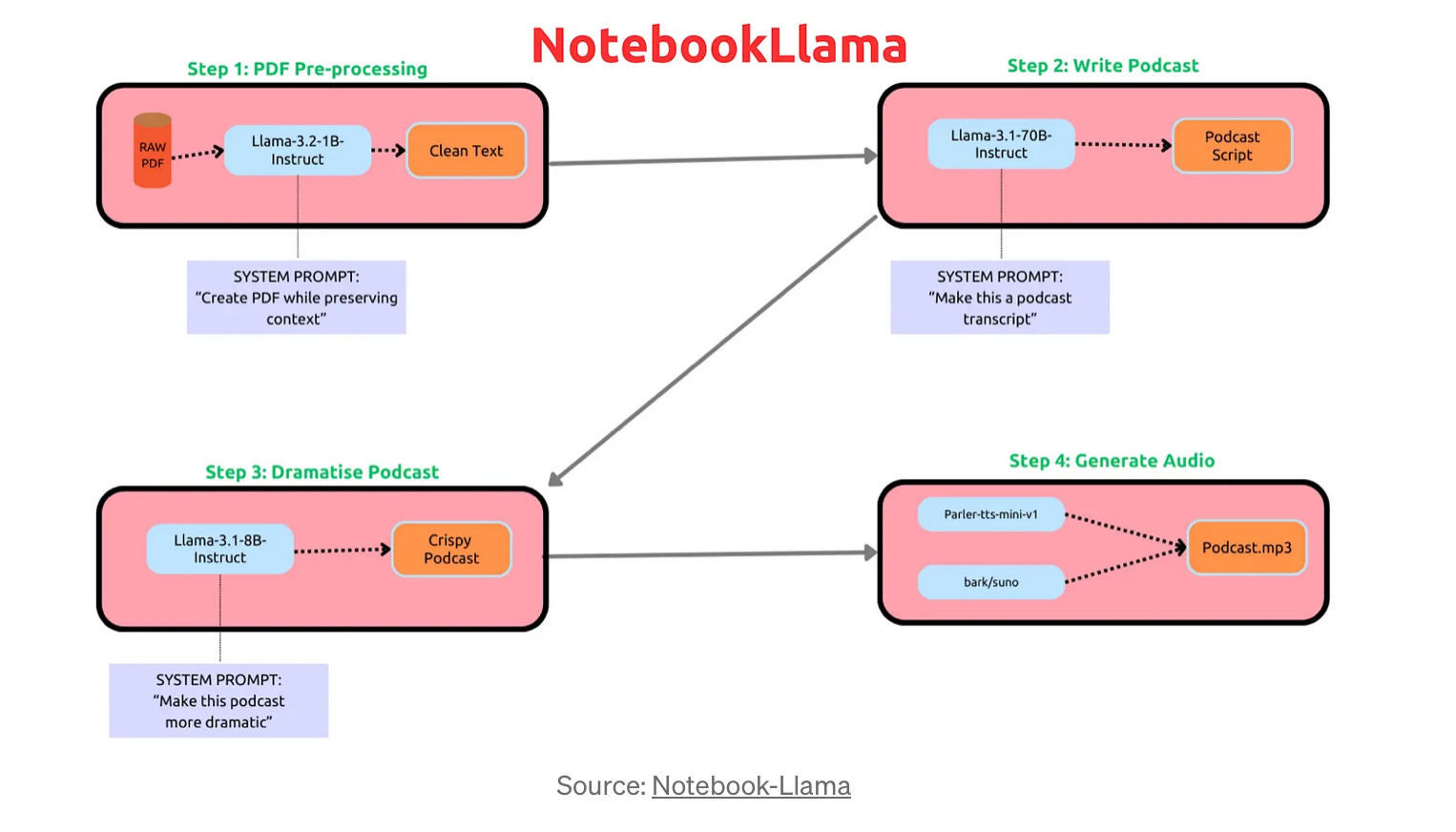
NotebookLlama provides a comprehensive tutorial series to create podcasts from PDFs using Large Language Models (LLMs) and Text-to-Speech (TTS) systems.
NotebookLlama is similar to Google’s NotebookLM in that both tools leverage LLMs to process and repurpose content, but they serve different needs. Google’s NotebookLM excels at summarizing and refining insights from documents, focusing primarily on preserving key information for knowledge workers.
In contrast, NotebookLlama goes beyond summarization by creating engaging audio content from PDFs using a multi-step pipeline that integrates text cleaning, script creation, dramatization, and audio generation. This unique workflow enables deeper creative transformation, making it ideal for dynamic content repurposing, storytelling, and enhancing audience engagement.
The workflow involves four main steps:
1. Pre-processing PDFs: Llama-3.2-1B-Instruct cleans and converts PDF content to text while preserving context.
2. Writing Podcast Scripts: Llama-3.1-70B-Instruct converts the text into creative podcast scripts.
4. Generating Audio: Uses Parler-TTS and Bark/Suno to convert scripts into conversational podcasts.
Why It Matters
GTM professionals, educators, and content creators can benefit immensely from this tool. It automates the entire transformation from static PDF content to dynamic audio podcasts, allowing for scalable, high-quality content production. Additionally, it supports experimenting with TTS models, LLMs, and prompts, making it highly customizable to various storytelling needs.
Practical Applications for GTM Professionals
1. Automated Content Creation: Convert company whitepapers, research reports, or training guides into engaging audio formats.
2. Enhanced Content Reach: Enables repurposing long-form content like reports or case studies into podcasts, broadening audience engagement.
3. Rapid Ideation and Prototyping: LLMs help generate and dramatize educational and marketing podcasts quickly, enabling fast testing of new ideas or narrative angles.
How Different Teams Can Leverage NotebookLlama’s Workflow
1. Sales
• Use Case: Transform sales guides or product manuals into audio versions for on-the-go training or client education.
• In Depth: Sales teams can create engaging sales training podcasts, allowing reps to consume training material while traveling or during breaks.
2. Customer Success
• Use Case: Convert FAQs or help guides into conversational podcasts to offer self-service customer support.
• In Depth: Automate the conversion of onboarding materials into audio formats, helping customers easily grasp product features and benefits.
3. Marketing
• Use Case: Create serialized, dramatized podcasts from market research reports or blog series to drive deeper engagement with target audiences.
• In Depth: Use the dramatization step to make complex concepts more relatable and appealing, increasing content stickiness and brand affinity.
4. Enablement
• Use Case: Produce podcast series based on internal knowledge bases or training documents for ongoing employee learning.
• In Depth: This workflow helps enablement teams scale training content production, providing employees with convenient, on-demand learning resources.
5. Business Development
• Use Case: Repurpose case studies and industry analysis into podcasts, supporting strategic partner and prospect outreach.
• In Depth: Use dramatic narratives to highlight success stories, increasing the appeal of partnership pitches or market insights.
6. HR
• Use Case: Convert HR policy documents and onboarding guides into engaging audio content, improving information dissemination.
• In Depth: HR can create dramatized onboarding podcasts, making company culture and policies easier for new employees to absorb.
Conclusion
My thoughts are honestly after trying both, I just like the user experience of Google NotebookLLM better and I believe the voices are way better as far as their relation to each other.
With NotebookLlama it feels still more like a robot and Google’s is far advanced. Cool to have a competitor, but Google wins this one to me.
The paper “Robustness of Transformers to Long-Range Contexts” delves into how Transformer models handle long-range dependencies, which is a critical issue in natural language processing tasks. Here’s a detailed breakdown of the key insights and implications for GTM professionals:
Overview and Motivation
The study examines the robustness of Transformer architectures when working with long-range contexts. This refers to the model’s ability to retain and utilize information from inputs that span many tokens or data points—think long documents, lengthy conversations, or sequences in transactional data. Understanding these properties is essential for applications that demand coherent analysis or decision-making over extended periods or large sets of information.
Key Findings
1. Memory and Performance Trade-offs: The study reveals a nuanced relationship between increasing context lengths and model performance. While Transformers generally benefit from extended contexts, the benefits plateau or even diminish at a certain point due to noise introduction and memory constraints.
2. Impact on Training Stability: Transformers face challenges maintaining stability in longer contexts. This finding emphasizes the need to carefully calibrate context windows, especially in tasks requiring accurate tracking of long-term dependencies.
3. Architectural Adaptations: The researchers explore modifications like sparse attention mechanisms or recurrence within Transformer models to manage long-range dependencies efficiently. These changes attempt to maintain computational efficiency without sacrificing contextual understanding.
4. Context Sensitivity and Scaling: As models grow in size, their ability to handle longer sequences improves, but this doesn’t translate linearly into performance gains. The study suggests that more refined designs are necessary to optimize large-scale language models effectively.
Why GTM Professionals Should Care
1. AI-Enhanced CRM and Data Analysis: In the GTM field, managing and extracting insights from vast customer interaction datasets is crucial. This paper’s findings on memory and long-range context can help optimize AI models used in CRM systems to better understand customer journey patterns, identify sentiment trends, and anticipate customer needs in lengthy conversations or complex transactions.
2. Personalized Marketing and Long-Term Trends: Understanding long-term patterns is vital for designing personalized marketing strategies. Knowing how Transformer models behave with extended contexts allows marketers to predict trends in audience engagement and measure long-term campaign impact more effectively, enhancing predictive analytics capabilities.
3. AI-Driven Sales Coaching and Enablement: If your team is using AI for real-time feedback during calls, Transformers’ handling of long-range dependencies could influence how coaching insights are derived. This is particularly relevant in tracking sales reps’ conversations over time to identify recurring issues or highlight successful patterns.
Additional Prompting Strategies:
1. System-Level Instructions: The use of preamble instructions like “As an expert problem solver” sets a specific tone, encouraging the model to assume an authoritative or knowledgeable stance.
2. Step-by-Step Reinforcement: Repeating the phrase “Let’s think step by step” in every response (shot) reinforces a pattern of analytical reasoning. This can be crucial for tasks that require the model to synthesize information across a broad context.
3. Explicit Conclusions: Including an explicit conclusion like “The final answer is…” helps steer the model towards closing out responses clearly, avoiding incomplete or ambiguous outputs.
4. Increasing Contextual Anchoring: The prompt structure with multiple shots (repeated questions and solutions) encourages the model to maintain consistency across longer contexts. This is useful for situations where sustained reasoning or contextual carryover is necessary.
5. Few-Shot Learning: By introducing multiple examples in the few-shot style, the model is primed to follow the logical structure that was laid out in previous examples.
Conclusion
This study on the robustness of Transformers in handling long-range contexts carries critical implications for GTM professionals. By enhancing AI models’ ability to understand extended sequences, companies can unlock deeper insights from customer interactions, gain a clearer understanding of long-term market trends, and optimize internal processes. The key takeaway is that while longer contexts present challenges, embracing these advancements can lead to significantly more effective and predictive AI-driven solutions in sales, marketing, and customer success.
Deep Dive Review: Claude 3.5 Sonnet and Autonomous Desktop Capabilities
Anthropic’s updated Claude 3.5 Sonnet model introduces a revolutionary feature: interacting with a computer desktop environment. This allows Claude to not only process commands but to perform actions within a virtual machine, like saving files, using text editors, and running scripts. This functionality is designed to automate and optimize workflows by seamlessly executing tasks based on user prompts.
Why GTM Professionals Should Care
For GTM professionals, this breakthrough presents new ways to automate tasks, manage data, and create impactful AI-driven workflows. Claude’s ability to directly interact with desktop environments is a game-changer for businesses, especially in automating complex workflows like data entry, report generation, customer communication, and software operations. By expanding Claude’s capabilities, GTM teams can improve operational efficiency and unlock new levels of productivity.
Practical Applications of Claude 3.5 for GTM Professionals
1. Automated CRM Management: Claude can update, extract, or manipulate customer data within CRM applications autonomously, enhancing data accuracy and reducing manual effort.
2. Content Creation and Editing: Claude’s interaction with desktop tools enables automated document creation, updates, and formatting, saving hours on repetitive tasks. This can benefit sales decks, training materials, and marketing collateral.
3. Customized Report Generation: With access to spreadsheets and other software, Claude can autonomously compile and manipulate datasets, generating tailored reports based on predefined metrics or evolving business needs.
4. Automated Data Processing and Analysis: Claude’s ability to execute scripts and use editors allows GTM teams to process large datasets automatically, analyze trends, and extract actionable insights from vast volumes of data.
Implications and a Glimpse into the Future of AI Agents
The introduction of Claude 3.5 Sonnet’s desktop interaction capabilities marks a significant step toward autonomous AI agents. This development implies a future where AI systems are not just passively processing data but actively executing actions within virtual environments, enabling them to perform a broader range of tasks.
For GTM teams, this evolution hints at a future where AI agents can autonomously handle complex workflows like customer communications, CRM updates, and data analysis. It lays the groundwork for more sophisticated AI-driven agents that could independently manage entire business processes, from lead generation to customer retention, transforming how we approach automation in GTM functions.
This is undeniably a precursor to fully autonomous agents. We’re seeing foundational steps towards AI systems that can not only assist but operate semi-independently within sandboxed or secure environments. It’s a move toward AI agents that can eventually mimic more complex human decision-making processes while executing tasks within structured, guarded parameters.
To effectively leverage this technology, businesses must focus on setting clear constraints, prioritizing robust oversight, and ensuring agents are deployed for well-defined tasks that maximize efficiency without sacrificing security. This isn’t just an upgrade—it’s a glimpse of what GTM professionals will soon rely on to stay competitive in a rapidly evolving digital landscape.
Conclusion
Claude 3.5 Sonnet’s capability to interact with desktop environments unlocks new dimensions in AI automation. For GTM professionals, this breakthrough means streamlined processes, improved efficiency, and enhanced productivity across sales, marketing, customer success, enablement, and more. By harnessing Claude’s new capabilities, businesses can automate complex tasks, achieve greater accuracy, and drive transformative impact in their GTM strategies.
Recently I was introduced to ChatAE from it’s CEO and loved it so I had to share and ps a full demo from the CEO is now in the The GTM AI Demo Tools Library where you can watch for free.
ChatAE: An On-Demand Sales Co-Pilot
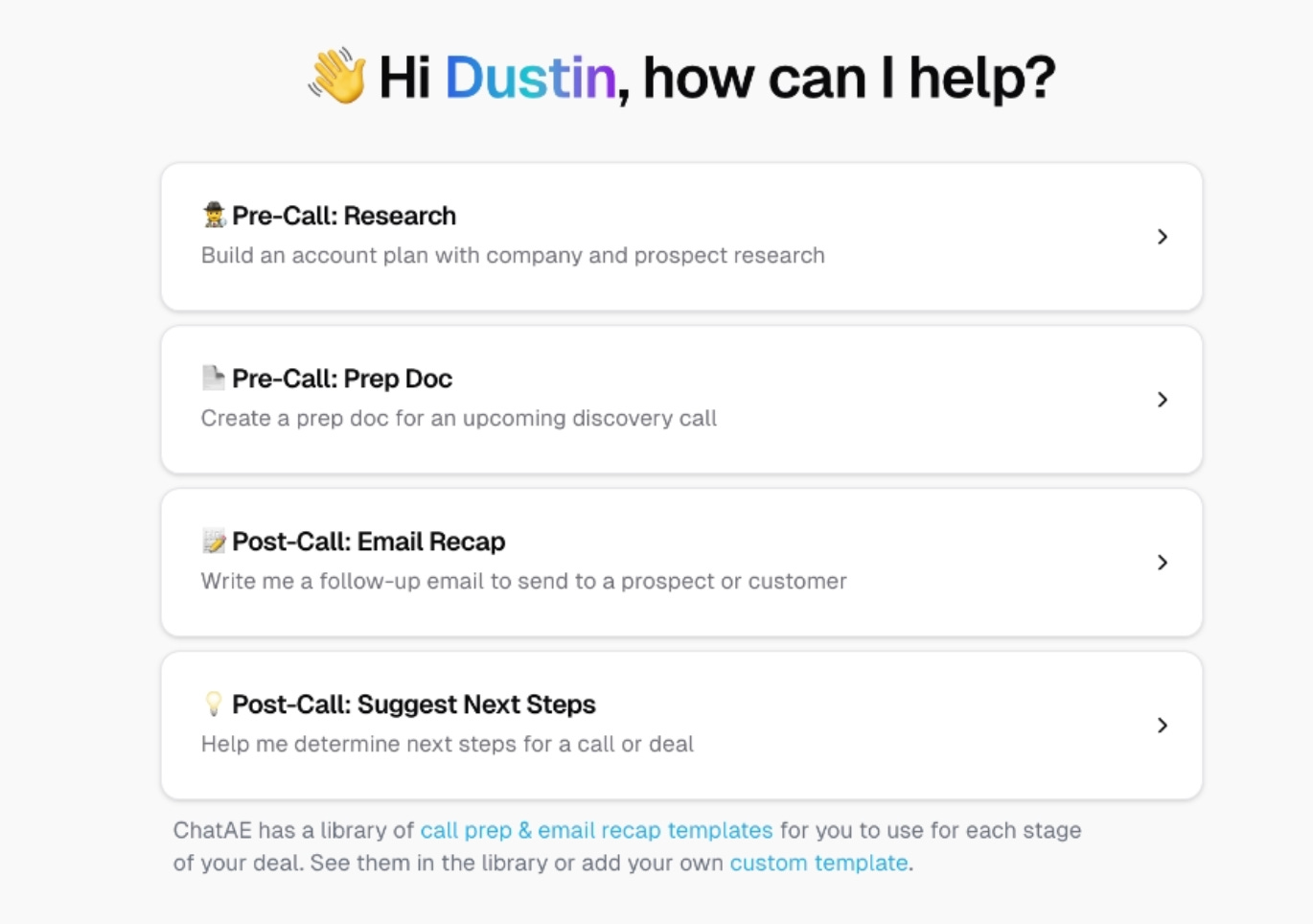
ChatAE is an innovative tool designed to act as a sales co-pilot, helping sales professionals with key pre-call and post-call tasks. The platform focuses on four core flows: research, call prep, email recaps, and next steps, making it a powerful assistant for sales reps aiming to maximize efficiency and accuracy in their workflows.
Why GTM Professionals Should Care
For GTM professionals, ChatAE offers the ability to automate crucial sales tasks, reduce administrative load, and enhance preparation for customer interactions. It bridges the gap between manual sales research and automated insights, enabling sales teams to focus on strategy and relationship building instead of repetitive tasks.
Practical Applications of ChatAE for GTM Professionals
1. Sales Research: ChatAE automatically gathers comprehensive data about target companies and prospects, including company details, competitive analysis, podcast appearances, and social media activity. Sales reps can leverage this information to enter calls better prepared and more knowledgeable, leading to more engaging and personalized conversations.
2. Call Prep and Agenda Setting: The platform generates structured call prep documents, which not only include talking points but also suggest question flows tailored to specific customer pain points. This structured approach enables reps to guide conversations more effectively and avoid missing critical discovery elements.
3. Email Recaps and Customization: Post-call, ChatAE crafts detailed email recaps, customized based on call type and stage. It provides a tailored email template, which can be further customized before sending. This ensures that follow-up communication remains accurate and aligned with the sales strategy.
4. Next Steps Recommendations: Acting as an on-demand sales manager, ChatAE analyzes call transcripts to suggest logical next steps, such as setting up additional meetings, creating comparison documents, or sharing relevant case studies. These suggestions are based on contextual insights gathered from multiple calls, helping reps keep deals moving forward efficiently.
How Different Teams Can Use ChatAE
1. Sales
• Use Case: Sales teams can use ChatAE to streamline call prep, ensuring each rep approaches conversations with a strategic framework and essential insights about the prospect and their challenges.
• In Depth: By automating research and call planning, sales teams can save hours of manual preparation, reducing the risk of unproductive meetings and improving call effectiveness.
2. Customer Success
• Use Case: Automate the creation of follow-up communications and strategic plans for client meetings, ensuring continuity and focus in ongoing engagements.
• In Depth: ChatAE’s ability to suggest tailored next steps based on call context enables customer success teams to proactively address client issues and strategically plan touchpoints.
3. Marketing
• Use Case: Marketing teams can leverage ChatAE to gather insights from sales calls, identifying recurring objections and successful messaging, feeding those learnings into campaign optimization.
• In Depth: With ChatAE’s analysis of call transcripts and customer feedback, marketing teams can gain real-time insights into messaging effectiveness and pain points, refining campaigns on the fly.
4. Enablement
• Use Case: Enablement teams can build training programs using ChatAE’s structured call flow documents as examples, teaching reps how to approach different types of calls strategically.
• In Depth: By providing reps with dynamic agendas and tailored question flows, enablement teams can standardize best practices and scale their impact across the entire salesforce.
5. Business Development
• Use Case: Business Development teams can automate research on potential partners or market opportunities, preparing comprehensive overviews for strategic conversations.
• In Depth: ChatAE’s detailed research capabilities enable BD teams to approach partnership discussions with full knowledge of each company’s positioning, competitive landscape, and recent developments.
6. HR
• Use Case: HR can use ChatAE to automate and structure onboarding plans, especially for sales roles, ensuring new hires understand key customer pain points, common objections, and effective call structures.
• In Depth: By generating tailored training documents, HR can deliver a streamlined onboarding experience, focusing on the specific skills needed for success in the sales team.
Conclusion
ChatAE offers a powerful AI-driven approach to sales management, covering pre-call research, call preparation, follow-up, and strategic planning. For GTM professionals, it automates essential tasks, reduces administrative burdens, and enables more strategic decision-making. By leveraging ChatAE, teams across sales, marketing, customer success, and beyond can optimize workflows, gain deeper insights, and improve overall sales effectiveness. This tool not only enhances efficiency but also empowers teams to approach customer interactions with data-driven confidence.