

Everyone once again I am here and just want to say THANK YOU for your patience. It has been a wild month of August for me moving and getting settled with little ones, school starting, and shifts in my professional world that made podcast interviews were challenging.
Thankfully I am back at it and have some really amazing guests to get things kicked back off in the best way possible.
Let’s get into it
In June, Joel Horwitz ran a lead gen campaign on LinkedIn for a client and it came back at $1,800 per lead.
This is a guy who ran product-led growth for all of IBM. 800 digital marketers across the world reported into his org. He was VP of Product Marketing at Weights & Biases. He ran growth at Sourcegraph and helped launch Ampcode, one of the first real coding agents. He has now written more than 7 million lines of code with AI agents to build his own ad platform.
And he told me, on the podcast, that he was almost in tears looking at that campaign.
I’ve been on the other end of that same feeling for five years. I’ve hired agencies, including one of the top LinkedIn ad shops in the business, with great products and great orgs behind me, and the best result I ever got from social ads was “brand awareness.” Which is the thing you say when you can’t point to a lead.
So I asked Joel the question I’ve wanted to ask someone for a long time. Why?
The part nobody tells you
Here’s the mechanism, and it took Joel six months of digging to find it.
LinkedIn has two API tiers. The developer tier is what most tools and most agencies run on. It lets you launch campaigns, set budgets, pick targeting criteria. It does not let you use custom audiences. That feature sits behind the Marketing API tier, which LinkedIn hands out to very few people.
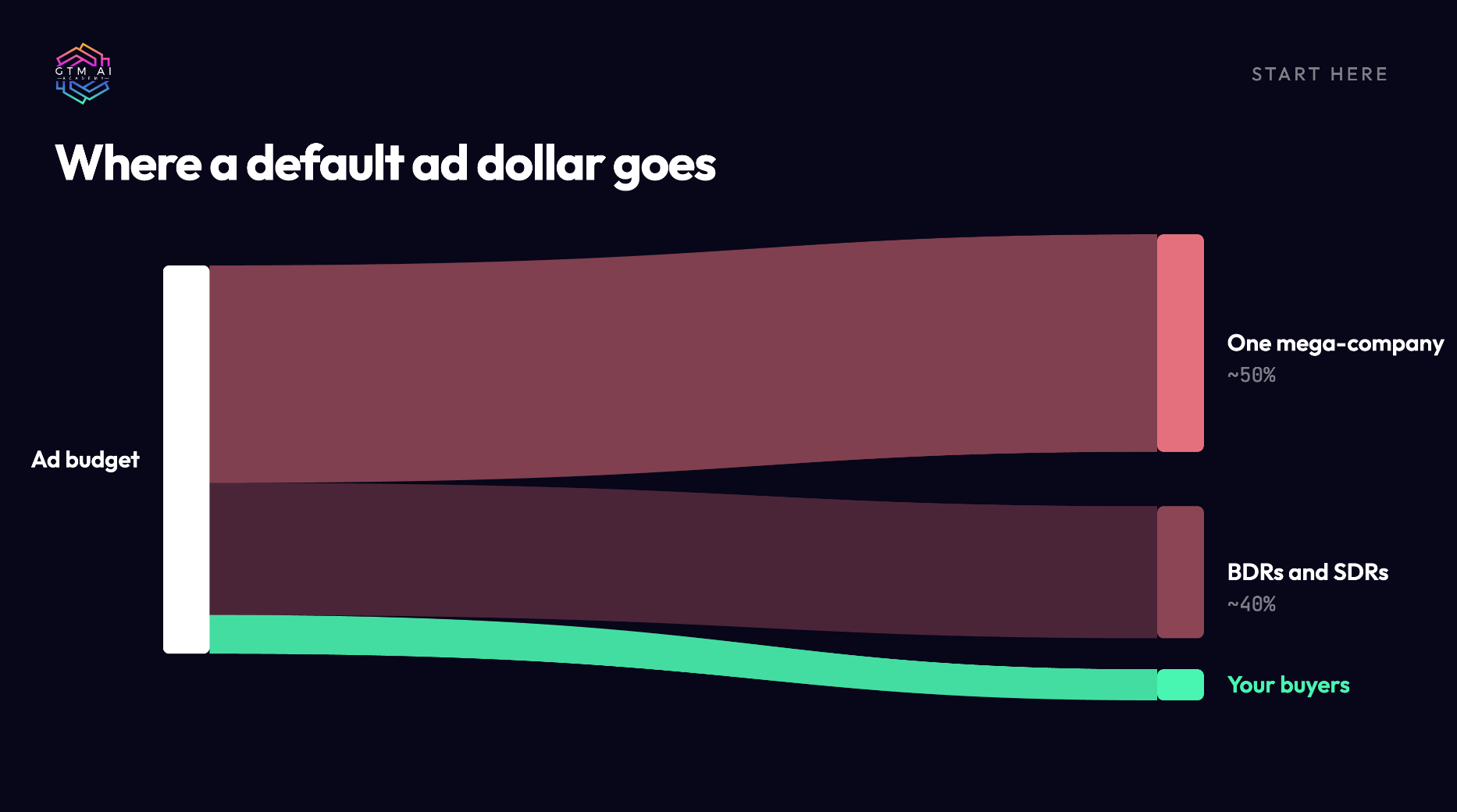
So what happens to your money when you run ads without real audiences? Joel sees the same two things every time. You set up your targeting by title and industry, come back a month later, and one enormous company has absorbed most of your spend. In his case it was Walmart. Thousands of employees match your criteria, the algorithm finds them, and your budget goes to people who will never buy. Whatever’s left lands on business development reps, because they are the most active people on the platform and they click on everything.
That was the $1,800 lead. Good creative, reasonable offer, real budget, and the platform quietly sent it to the wrong 10,000 people.
The same shape shows up on Meta and Reddit. The platform’s default targeting optimizes for who is easy to reach, not who is likely to buy. Without your own audience data, you are paying to find out who is cheap.
What Joel does instead
Once he had audiences unlocked, the playbook flipped.
He stopped starting with paid. Synter’s company page went from zero to about 2,500 followers in three months, and none of it was ad spend. He posted. Then, and only then, he used audiences to reach the people who had already raised a hand. Retarget your followers on LinkedIn. Retarget them on Reddit, where they also live. Or skip the ad entirely, pull the domain, and send a human message.
His line on it was the best thing in the episode: “Don’t start from the bottom. This is not a Drake song.”
That reordering is the whole insight. Most of us run social ads as a cold introduction. Joel runs them as a follow-up.

The bigger idea underneath it
Then he showed me something on screen that I’ve been doing by hand for years, badly.
He typed one request into his agent: pull the last 30 days of organic search performance, find the keywords getting impressions but zero clicks, and target those with exact-match Google Ads.
Think about what that list is. People are searching for things you already rank for, they see you on the page, and they don’t click. Either the page is wrong for the query or someone else’s listing is winning. You should fix the page. That takes weeks. In the meantime, you can bid on the exact term for a few dollars a day and win the click while the fix ships.
Joel calls this demand capture, and he treats it as a different discipline from demand generation. Demand gen tries to create interest. Demand capture finds interest that already exists and shows up in front of it. He says it’s the most sustainable engine he’s built, whether the company is a two-person startup or IBM.
What makes it work is refusing to treat SEO and paid search as separate teams. The buyer doesn’t know which budget line paid for the result they clicked. When your organic data and your paid accounts sit in the same system, the organic report becomes the paid media plan.
Same logic applies to social. The followers you earned organically are your best paid audience. The threads where people already discuss your problem are where your ads should run. Every channel has a “demand already exists here” layer, and almost nobody is buying ads against it.
The five lines I keep thinking about
“I don’t call this demand generation. This is demand capture. I look for where there’s already demand.”
“Everyone separates SEO from paid search. They treat these as different things. They’re not. They’re the same.”
“$1,800 cost per lead. I’ve never seen a worse campaign in my life. And then I realized: audiences.”
“In 2022, 2023, everyone said paid media doesn’t work. They fired their marketing teams, fired their agencies. Two years later: we have no pipeline. Now everyone’s back, OpenAI is doing ads, and no one knows how the heck to do ads.”
“The more gap you put between your go-to-market team and your development team, the worse you’re going to do.”
Why this matters right now
Joel’s clients are all making the same move. They use an agent to audit what their agency has been doing, and then they bring paid media in-house. Higher click-through rates, higher ROAS. The technical founders who always hated ads (usually because the positioning was off and they could feel it) are finally close enough to the work to fix it.
That’s the window. Agencies had a two-year run filling the hole that the 2022 layoffs created. Agent-run ad platforms just made it possible for one person to see everything the agency sees, in one afternoon.
I’m putting Synter into my own agent setup this month to test all of this on my own accounts. I’ll share the numbers either way.
What to do this week
Ask whoever runs your LinkedIn ads one question: “Are we on the Marketing API tier with custom audiences enabled?” A pause is your answer.
Export 30 days of Search Console. Filter for 100+ impressions and under 1% CTR. Hand the list to your ads person with a small exact-match budget.
Build one retargeting audience from your organic followers before you spend another dollar on cold targeting.
THE DEMAND CAPTURE PLAYBOOK
6 fixes for ads that don’t produce pipeline
From the GTM AI Podcast episode with Joel Horwitz, founder of Synter (ex-IBM, Weights & Biases, Sourcegraph). Compiled by Coach K, GTM AI Academy.
Start here
Most paid media fails for a boring reason. The money goes to the wrong people, in the wrong order, from a system that can’t see what the other systems know.
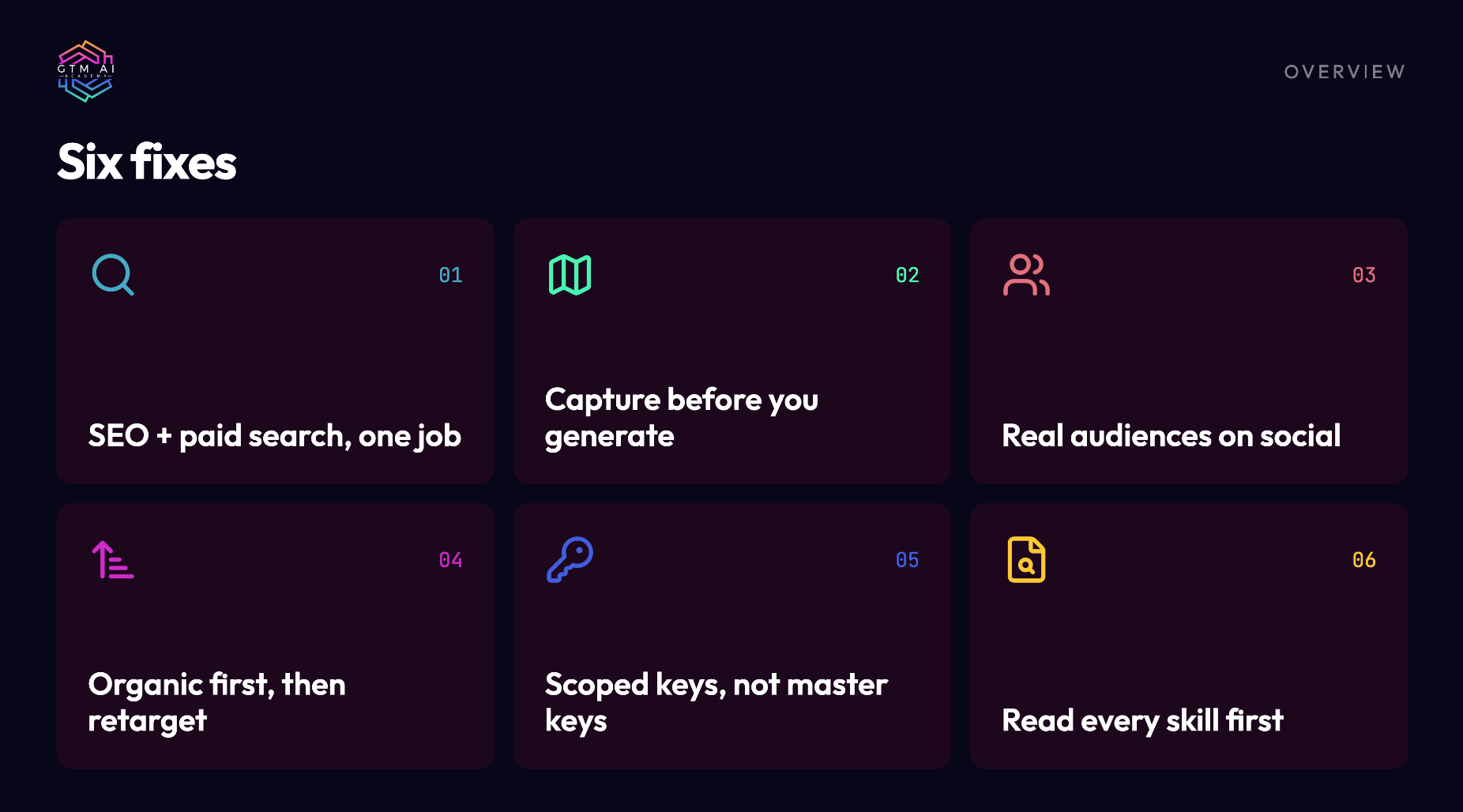
This playbook covers six fixes that came out of one conversation with Joel Horwitz. Joel ran product-led growth for all of IBM, then growth at Sourcegraph, and now runs Synter, an ad platform operated by AI agents. He spent six months figuring out why his own LinkedIn campaigns underperformed and came out the other side with a different model for paid media.
Each fix follows the same shape: what’s broken, why it happens, how to fix it step by step, what to measure, and how it usually fails when people try it. Read the ones that hurt. Skip the rest.
Quick self-check. If any of these are true, at least one fix applies to you:
Your social ads report “brand awareness” and nothing else
Your SEO team and your ads team have never sat in the same meeting
You can’t name your cost per lead by channel without asking someone
An AI agent has access to your ad accounts and you’re not sure what it can do
You installed a skill or workflow file without reading it
Fix 1: Run SEO and paid search as one job
What’s broken. Organic search and paid search sit in different teams with different tools and different reports. The organic team optimizes rankings. The paid team optimizes CPC. Nobody owns the question “where are people already looking for us and not clicking?”
Why it happens. The tools were built separately. Search Console lives with SEO. Google Ads lives with paid. The reports never meet, so the insight never forms.
The fix. Treat organic search data as the input to your paid search plan. Your zero-click keywords are a list of buyers who already know you exist.
Step by step:
Open Search Console. Set the date range to the last 30 days.
Export the Queries report. You want query, impressions, clicks, CTR, and average position.
Filter for impressions over 100 and CTR under 1%. Sort by impressions descending.
Flag the commercial-intent rows: pricing, cost, vs, alternative, review, best, “for [use case].”
Hand that list to whoever runs Google Ads. Exact match only. Small daily budget per term ($5 to $20) to start.
Separately, queue the organic page fix for each flagged term. The ad buys time while the page gets rewritten.
If you’re running an agent connected to both systems (Synter does this natively; you can also wire Search Console and Google Ads into Claude or another agent through their APIs), the whole sequence is one prompt: “Pull the last 30 days of organic search performance, find keywords with impressions but zero or near-zero CTR, and build exact-match Google Ads campaigns for the commercially relevant ones. Draft mode.”
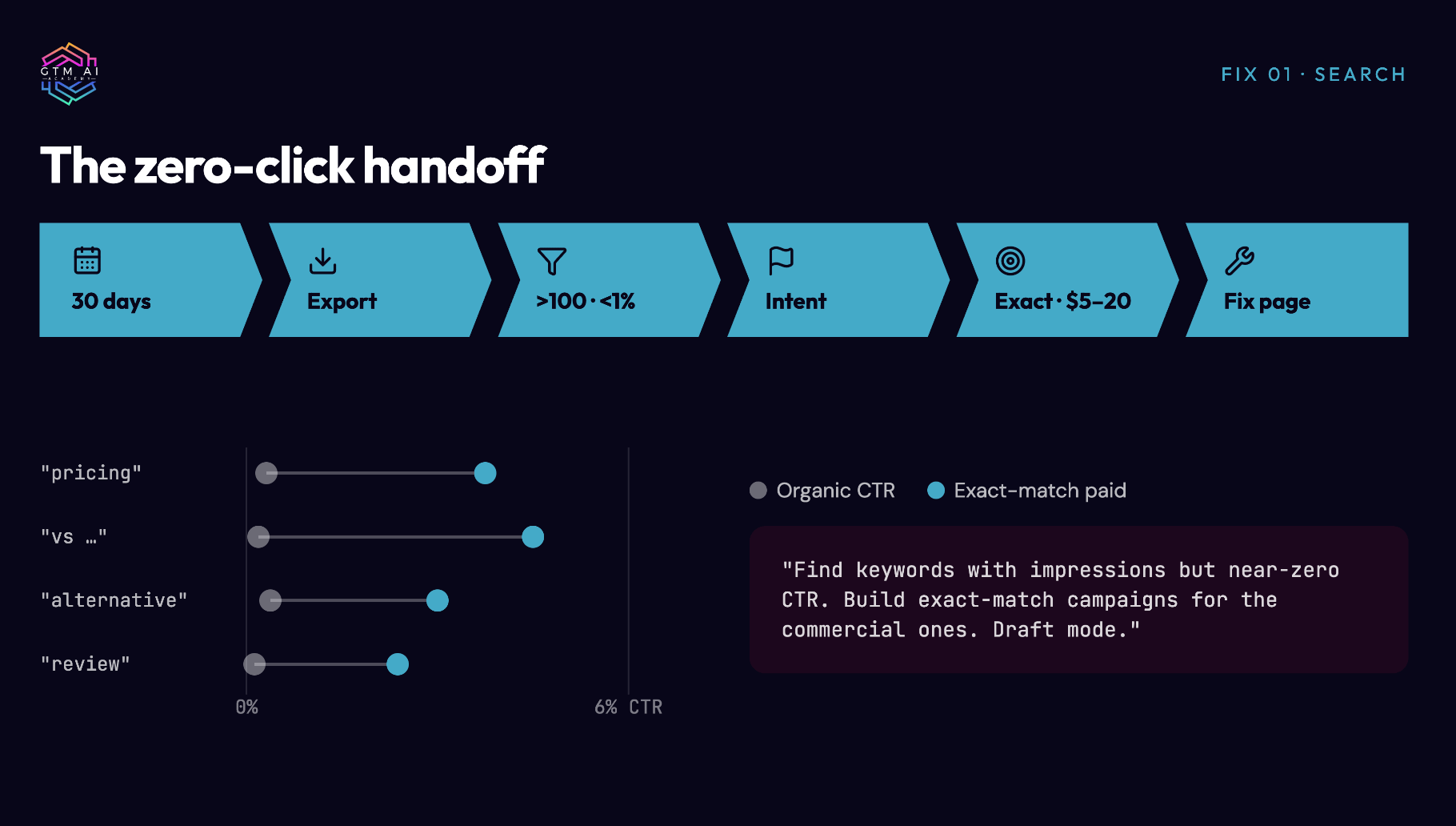
What to measure. CTR on the paid version of each term versus its organic CTR. Cost per click on exact-match terms versus your account average (these are usually cheaper because the intent is narrow). Organic CTR on the same terms 60 days later, after the page fix.
How it fails. Broad match. The moment you loosen the match type, you’re back to buying generic traffic. Keep it exact until you have data. The second failure is skipping the page fix, which means you pay for the click forever.
Fix 2: Capture demand before you generate it
What’s broken. Most paid budgets go to demand generation: creating interest in people who weren’t looking. It’s the most expensive thing you can do with an ad dollar, and it’s the default because it’s the thing agencies know how to sell.
Why it happens. Demand gen is visible. Big campaigns, new creative, a story to tell the board. Demand capture is quiet. It looks like a spreadsheet of search terms and a list of subreddits.
The fix. Before any cold campaign, map the places where demand for your problem already exists and put your budget there first. Joel’s phrase: “I look for where there’s already demand.” He calls it the most sustainable engine you can build.
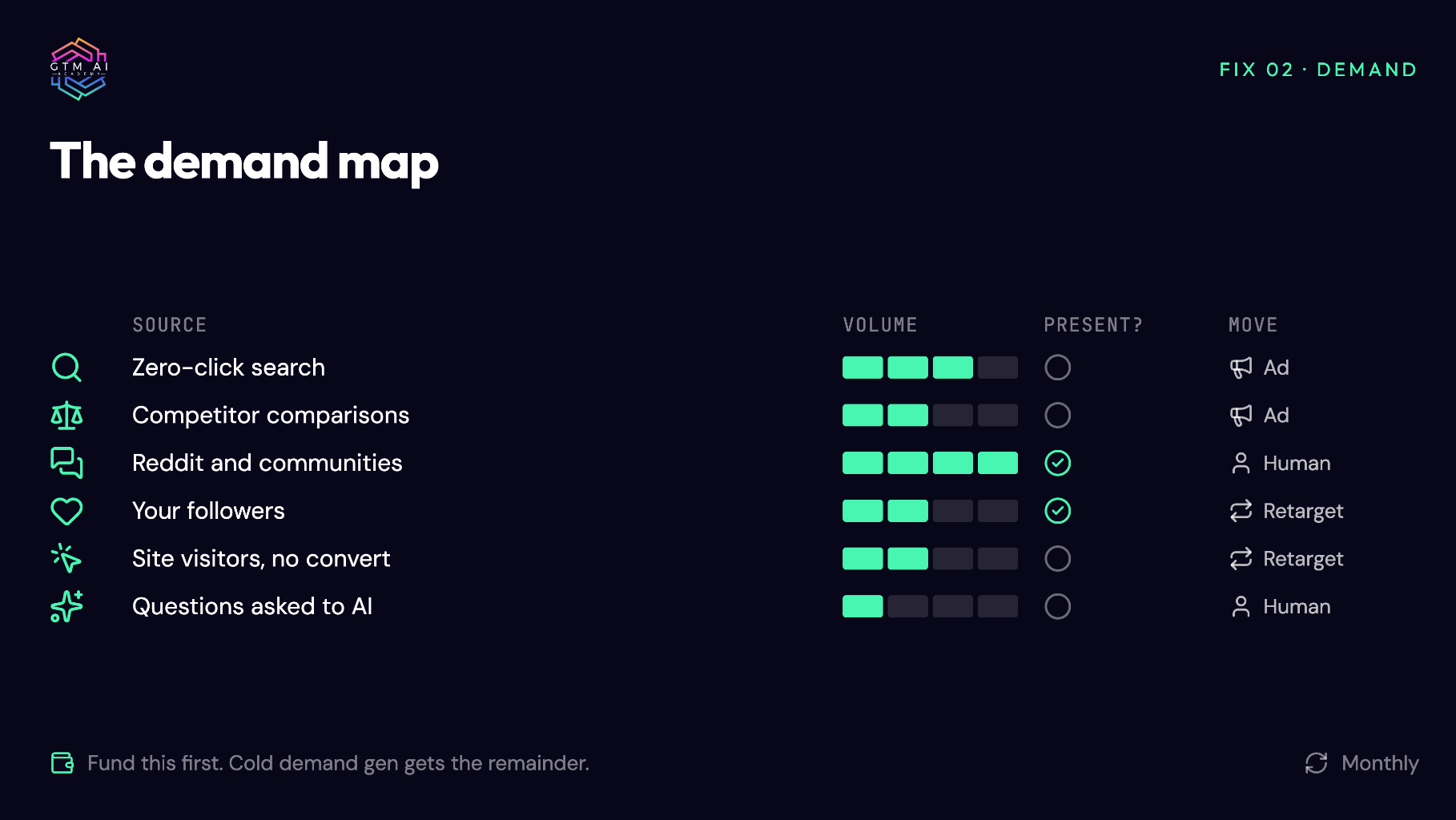
Where demand already exists:
Search queries you rank for but don’t win (Fix 1)
Comparison and alternative searches for your competitors
Reddit threads and communities where your problem is actively discussed
Your own organic followers (Fix 4)
Your website visitors who didn’t convert
Questions your buyers ask AI assistants (AEO / LLM visibility tools like Gage or Gumshoe show you these)
Step by step:
Build a one-page “demand map.” One row per source above, with an estimate of monthly volume and a note on whether you’re present.
For each source, decide on one of two moves. Enter the conversation as a human (comment, answer, post), or serve an ad to that audience. Joel uses both, depending on the audience.
Fund the demand map first. Whatever is left goes to cold demand gen.
Revisit monthly. Demand moves.
What to measure. Cost per qualified lead from demand capture sources versus demand gen sources. Track them as two lines from day one. The gap is usually large enough to change your budget mix within a quarter.
How it fails. Treating demand capture as a one-time project. It’s an operating rhythm. The list of zero-click terms, active threads, and competitor comparisons changes every month.
Fix 3: Unlock real audiences on social (the LinkedIn problem)
What’s broken. Social ads, LinkedIn especially, reach the wrong people at scale. Campaigns finish with a good impression count, a plausible CTR, and no pipeline.
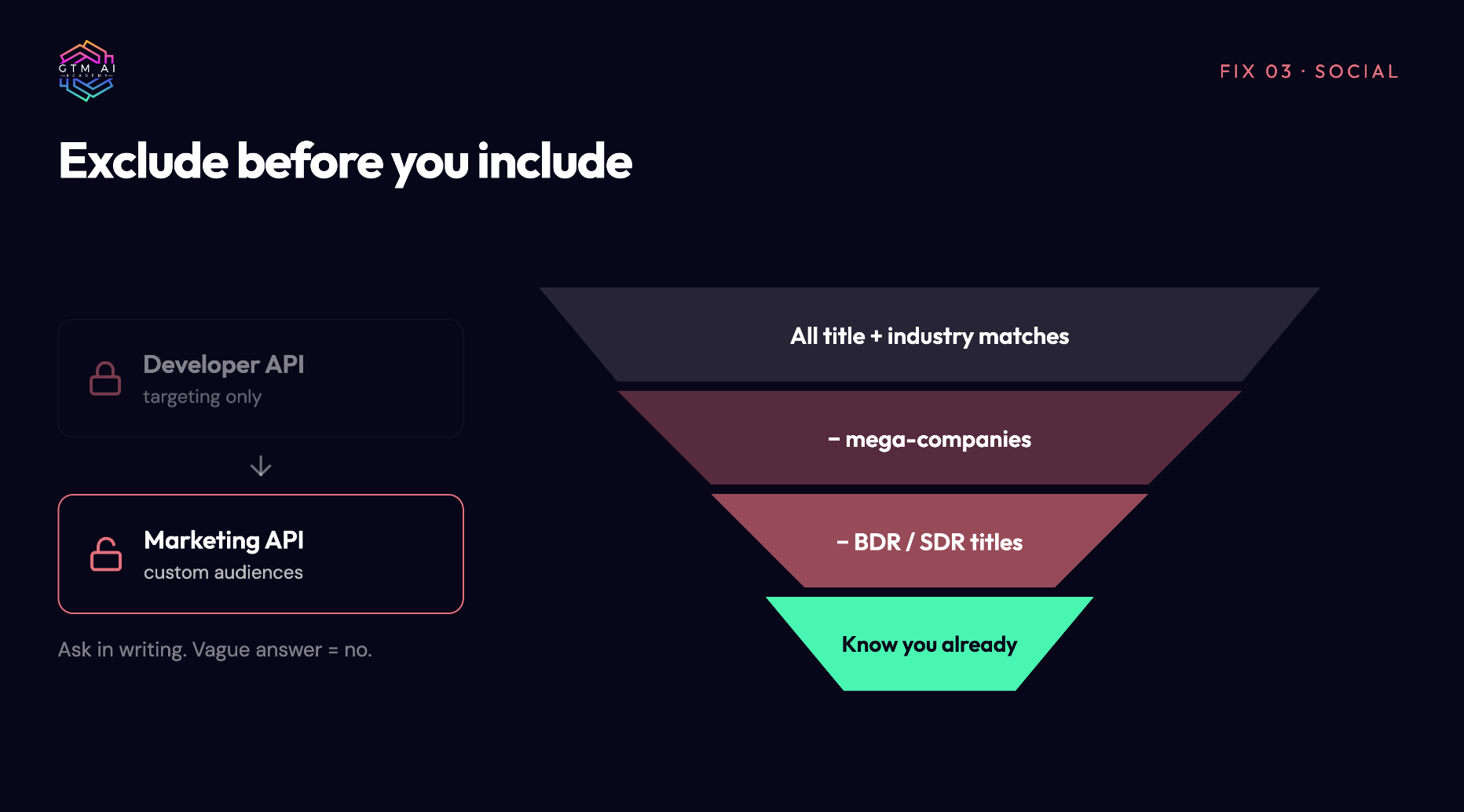
Why it happens. Most LinkedIn tooling and most agencies operate on the developer API tier. That tier lets you launch campaigns and set targeting criteria. It does not let you use custom audiences. Audiences (uploaded lists, retargeting pools, matched companies) live behind the Marketing API tier, which LinkedIn grants sparingly.
Without audiences, two things happen every time:
One giant company matches your title and industry criteria, the algorithm finds thousands of employees there, and they absorb most of your budget. Joel’s was Walmart.
The remaining spend goes to business development reps, because they are the most active users on the platform and click the most.
Joel’s June campaign at $1,800 per lead had good creative and a real budget. The platform sent it to the wrong 10,000 people.
The fix.
Ask your agency or your ads tool, in writing: “Are we on the LinkedIn Marketing API tier with custom audiences enabled?” A vague answer is a no.
If no, either apply for Marketing API access (expect friction), or move to a platform that already has it. Synter does; check any tool you’re evaluating for this specifically.
Once you have audiences, exclude before you include. Exclude the mega-companies and the BDR/SDR titles on every campaign.
Build your first audiences from people who already know you (Fix 4), not from cold firmographics.
Run the same audit on Meta and Reddit. The mechanism differs but the pattern is identical: default targeting optimizes for who is cheap to reach, not who is likely to buy.
What to measure. Cost per lead by audience type (cold firmographic vs. retargeting vs. uploaded list). The share of spend going to your top 5 companies (if it’s over 20%, you have a Walmart). Lead title mix against your ICP.
How it fails. Getting audiences and then still leading with cold campaigns because the creative is ready. The audience unlock only pays off when you change the order (Fix 4).
Fix 4: Organic first, then retarget
What’s broken. Ads are used as an introduction. The first time a buyer sees your company is a sponsored post, which is the most expensive and least trusted first impression available.
Why it happens. Organic feels slow and unmeasurable. Paid feels controllable. So paid goes first.
The fix. Flip the order. Earn attention organically, then use paid to follow up with the people who showed up. Synter’s page went from zero to roughly 2,500 followers in three months with no ad spend, and those followers became the retargeting pool.
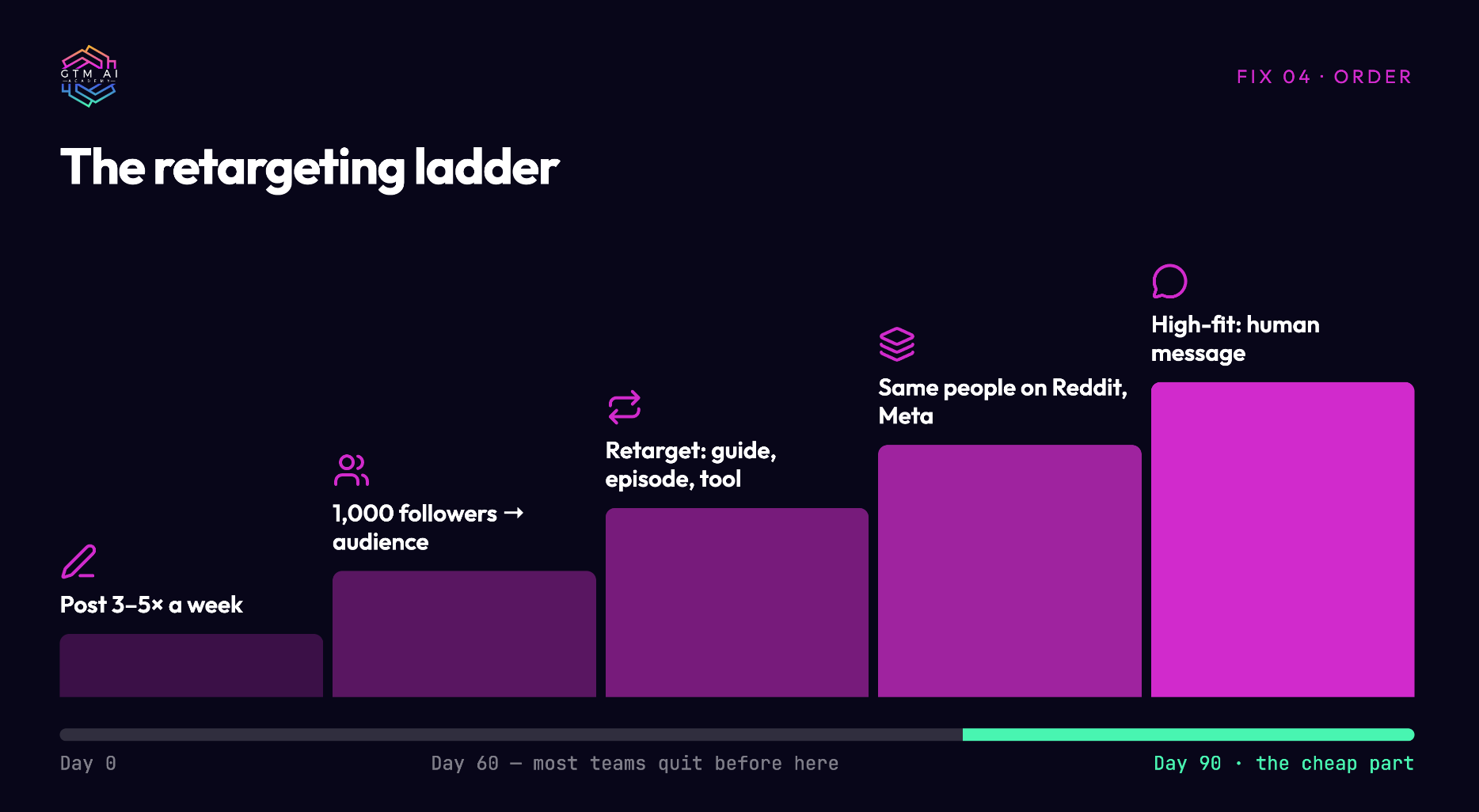
Joel’s rule: “Don’t start from the bottom. This is not a Drake song.”
Step by step:
Post consistently from the company page and from founders or leaders. Frequency matters more than polish. Three to five posts a week is the floor.
At around 1,000 followers, build a retargeting audience from followers and engagers.
Retarget them on LinkedIn with a low-friction next step: a guide, an episode, a tool. Not a demo request.
Retarget the same people on Reddit and Meta, where the same humans are cheaper to reach.
For high-fit accounts, skip the ad. Pull the domain, find the right person, send a human message that references what they engaged with.
What to measure. Follower growth rate (weekly). Retargeting CPL against cold CPL. Reply rate on human outreach to engagers versus cold outreach.
How it fails. Impatience. The organic layer takes 60 to 90 days to be worth retargeting. Teams that quit at week four never see the cheap part.
Fix 5: Give your ad agents scoped keys, not master keys
What’s broken. As teams hand ad accounts to AI agents, the default is full access. A developer key pulled from Google Ads or Meta gives the agent everything the account can do, with no way to narrow it. Then a prompt misfires and something goes live.
Why it happens. The ad platforms’ developer keys were built for scripts written by humans who tested them. Agents run more often, on more inputs, with less supervision. The permission model didn’t move.
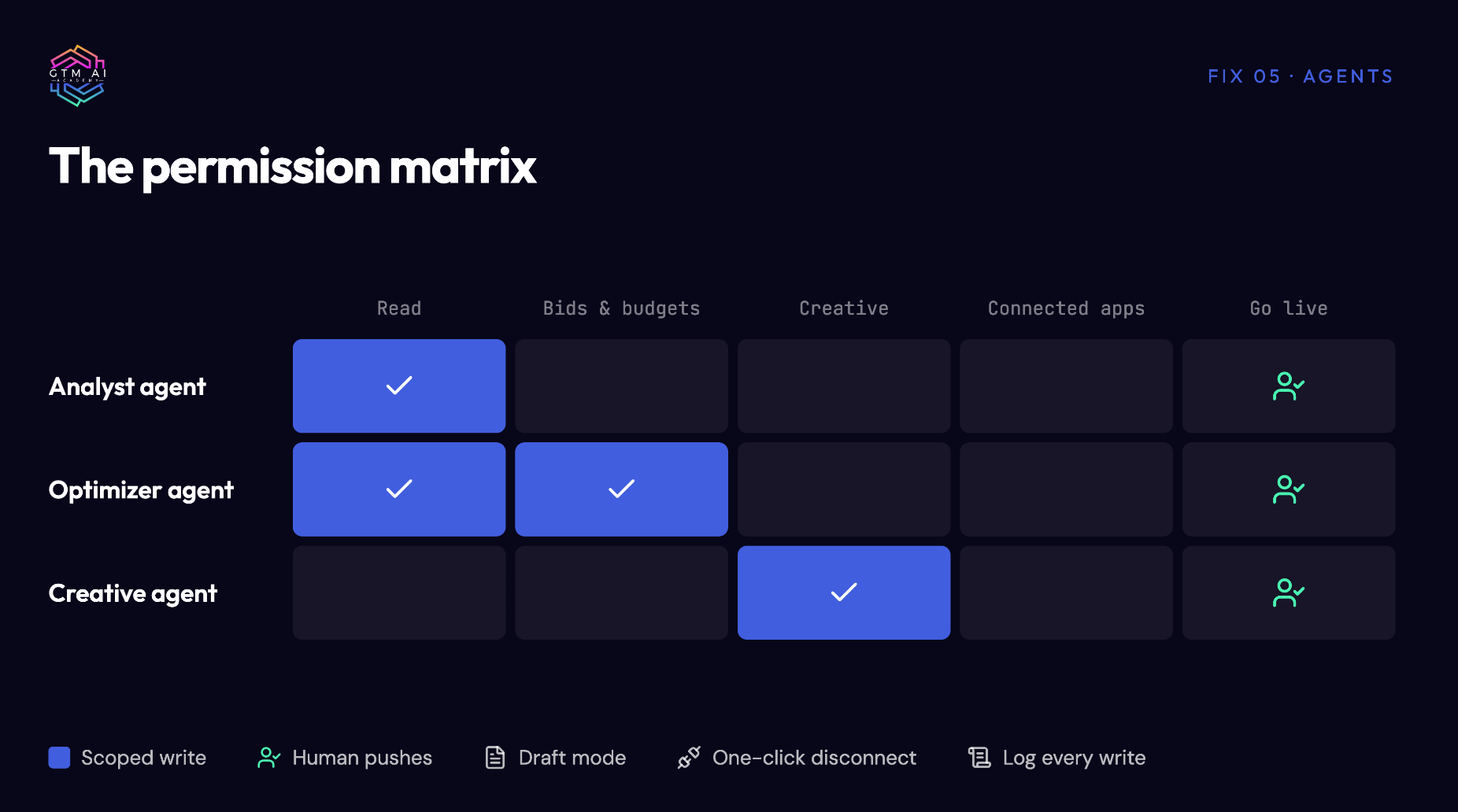
The fix. Treat an agent that can spend money the way you treat a Stripe key. Scope it. Sandbox it. Make disconnection one click.
Step by step:
One key per agent. The analyst agent gets read-only. The optimizer gets write access to bids and budgets, nothing else. The creative agent gets no account access at all.
Default every new key to read-only. Expand permissions deliberately, one capability at a time.
Run in draft mode until you trust the output. Joel’s platform has an explicit draft/live toggle so an agent can build a full campaign in a sandbox. If your tooling doesn’t have one, simulate it: the agent writes the campaign spec to a doc, a human pushes it.
Keep a one-click disconnect for every connected account (Shopify, Merchant Center, CRM). If the agent shouldn’t wander into a system for this task, unplug it for this task.
Log every write action with the prompt that caused it. When something looks wrong, you want the trail.
What to measure. Number of live actions taken by agents per week, and how many of them were reviewed by a human first. Time from “agent proposed” to “human approved.” Zero unplanned live pushes is the target.
How it fails. Setting up scoped keys once and then granting “all access” the first time the agent asks for something it can’t do. Every expansion should be a decision, not a reflex.
Fix 6: Read every skill file before you install it
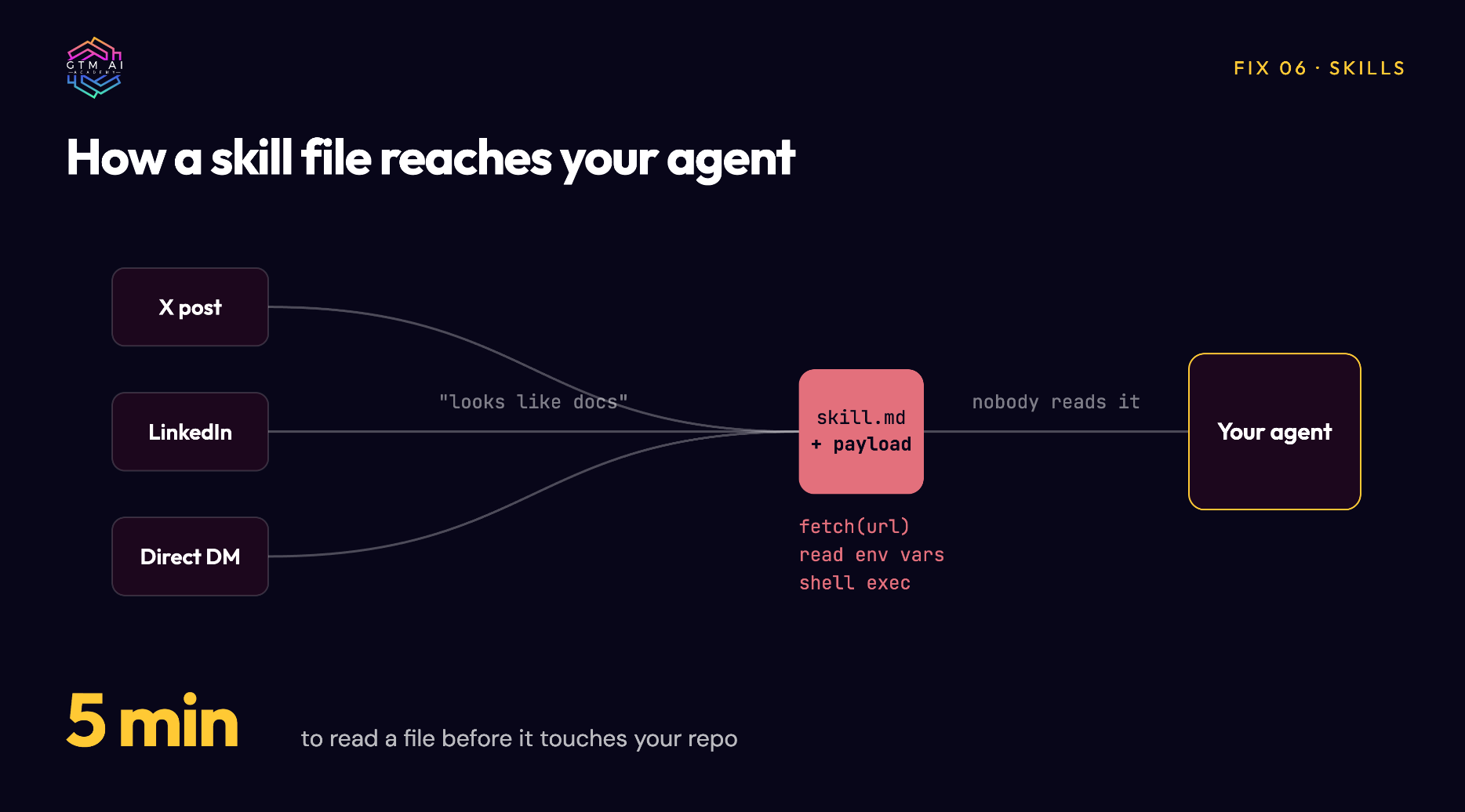
What’s broken. Skills, workflows, and prompt packages get shared like memes. Someone posts one on X or LinkedIn, or DMs it to you, and it goes straight into your agent’s repo. Some of them contain malicious code.
Why it happens. Skill files look like documentation. Nobody reads documentation. And the person sharing it usually has a big audience, which feels like vetting.
The fix. Joel found malicious code in shared skill files and built an open-source project, Agent Shield, to scan for it. His rule is simple and it costs you five minutes.
Step by step:
Only install skills from a source that audits them. skills.sh runs security checks and shows install counts (Corey Haynes’ cold email skill has about 99,000 installs, which is a real signal).
When someone sends you a skill directly, thank them, then put it on an audited source or run it through a scanner like Agent Shield before it touches your repo.
Read the file. Look for anything that reaches out to a URL, reads environment variables, or executes shell commands that have nothing to do with the skill’s stated purpose.
Install into a sandboxed agent first. Watch what it does on a test task.
Keep an inventory. Every skill, where it came from, who reviewed it, when.
What to measure. Percentage of installed skills with a recorded source and reviewer. Target is 100%.
How it fails. The inventory exists for a month and then stops. Make the review a step in your install process, not a separate audit.
The one-page checklist
Print this. Work through it with whoever runs your paid media.
Search
[ ] Search Console export, 30 days, filtered for 100+ impressions and under 1% CTR
[ ] Exact-match campaigns live on the commercial-intent terms
[ ] Organic page fixes queued for the same terms
Demand map
[ ] One-page demand map built (search, competitor comparisons, communities, followers, site visitors, AI answers)
[ ] Budget allocated to demand capture sources before cold demand gen
Social audiences
[ ] Written confirmation of LinkedIn Marketing API tier with custom audiences
[ ] Mega-company and BDR/SDR exclusions on every campaign
[ ] Top-5-company share of spend under 20%
Order of operations
[ ] Company and founder posting cadence at 3 to 5 per week
[ ] Retargeting audience built from followers and engagers
[ ] Human outreach process for high-fit engagers
Agent controls
[ ] One scoped key per agent, defaulting to read-only
[ ] Draft mode or human-push step before anything goes live
[ ] One-click disconnect on every connected account
Skills
[ ] Every installed skill has a recorded source and reviewer
[ ] Scanner (Agent Shield or equivalent) in the install path
Where this came from
Everything in this guide comes from one episode of the GTM AI Podcast with Joel Horwitz. He shared his screen and walked through the workflows live. If you want to see the demand capture prompt run in real time, the SEO-to-paid handoff, and the $1,800 lead story in his own words, the episode is on YouTube, Spotify, and Apple.
Joel is at syntermedia.ai and synterai.com. His DMs are open on X.
I’m Coach K. I run GTM AI Academy, where 10,000+ GTM practitioners have learned to build AI into how they sell, market, and grow. If this playbook helped, the newsletter goes deeper every week.
My challenge to you: pick the fix that hurt the most to read and finish its checklist section before Friday. Then tell me what you found.