

Welcome everyone! This marks the 2nd podcast of the week, because of how relevant they are and to make sure they are the latest and greatest for you to have in this ever changing AI world.
As a reminder, we will always offer this GTM AI Podcast and Newsletter with its assets or giveaways for free. We have a library of strategic and tactical video walk throughs of anything from tech guides, to connecting multiple systems together, to how to set up advanced multi agent frameworks that you can do in the paid level.
You are welcome to join us anytime!
Lets dig into it with Arup on Clay.com

You can go to Youtube, Apple, Spotify as well as a whole other host of locations to hear the podcast or see the video interview.
Most Clay users are spending $2K a month to build prettier ZoomInfo clones. Same firmographic filters, same ICP lists, prettier spreadsheet. Arup Chakravarti is doing something different, and the reason has almost nothing to do with Clay.
This week on the podcast I sat down with Arup, a 20-year RevOps and enablement vet and a Fellow at the Institute of Sales Professionals. He spent the last couple of months going deep on Clay, and he told me upfront he’s not a guru. He’s right. He’s something more useful: an enablement brain pointed at a GTM tool. That framing is the whole insight.
“One doesn’t need to be a guru to actually get a bit of distance in terms of an understanding.” – Arup Chakravarti
Here’s what he showed me:
1) The column most Clay users never build, because they don’t have the lens to know it exists.
Arup’s use case was a UK healthcare sector list, built from a real ISP case study where the economic buyer was a sales leader who was, in his words, “fully vested in helping his sales team develop.” That phrase is the whole job. Not title. Not company size. Not funding stage. Emotional investment in the sales team’s growth.
Most Clay tutorials stop at firmographic filters and job title searches. Arup added a column he called PDP Advocacy. A classifier that scores every sales leader as a Strong, Moderate, or Weak advocate for professional development, based on their LinkedIn profile, posts, comments, and likes.
What it pulls in:
Profile “about” section language around coaching, development, growth
Post content and commentary on learning, enablement, team-building
Likes and engagement patterns on sales development content
A confidence score plus a written rationale per lead
The output on one prospect, Rafale Gang, came back “Rafale consistently promotes the development of people, internal progression, coaching style... his authored content explicitly frames leadership as a practice of growing others.” That’s not a firmographic. That’s a psychographic fingerprint.
The shift: stop filtering for fit. Start filtering for emotional resonance with what you actually sell.
2) The iteration that unlocked it was one word.
Arup’s first draft prompt scoped the classifier too narrowly. He was asking Clay: is this person an advocate for the sales function? The qualified pool was tiny. Then he caught himself.
“I first started off with a very, very narrow focus on ‘is this leader an advocate for the sales function?’ And then I was kind of a bit like, actually, to be fair, I’m just being too narrow here. Is this leader an advocate for professional development?” – Arup Chakravarti
One word swap. Function → development. The qualified pool expanded dramatically, and the relevance to his pitch didn’t weaken at all. Because if you sell sales development services, a leader who advocates for professional development broadly will still resonate when you reach out about sales development specifically.
Here’s what matters about this move: a GTM engineer tuning prompts might have tightened the filter further to protect precision. An enablement person knew to broaden it, because enablement people understand that coaching culture and sales development culture are the same underlying belief.
The tactical shift:
Draft your psychographic prompt narrow
Then widen to the upstream belief that contains your pitch
Measure: does the broader net still pass the relevance test? If yes, keep it
3) Clay’s hidden data edge: the Google Maps integration, and better accuracy than LinkedIn.
Two things I didn’t expect.
First, the Google Maps integration pulls local businesses that aren’t on LinkedIn at all. Arup pointed at a road near his house lined with family law firms near the Watford Family Court.
“Some of your mom and pop stores in the local area are on LinkedIn. Why would they be, right?” – Arup Chakravarti
If your ICP is SMB, local services, or regional, the entire LinkedIn-first prospecting stack is blind to a chunk of your market. Clay + Google Maps sees them.
Second, employee count accuracy. Arup spot-checked Clay against LinkedIn and against published annual reports. Clay tracked closer to the actual reported figures than LinkedIn did. LinkedIn inflates headcount because third-party resellers, influencers, and tagged contractors all count toward a company page. Clay doesn’t have that problem.
Why this matters: if you’re segmenting by employee count, LinkedIn is giving you a wrong number. For any private company, cross-check against Clay before you commit to the filter.
4) The honest answer most vendor podcasts skip.
I asked Arup what results he was getting from the outreach emails Clay was generating off this stack.
“I don’t know, I haven’t operationalized any of this. I’ve been focused a little bit more on trying to get a job, so... as opposed to selling.” – Arup Chakravarti
That’s the answer I trust. He built the method. He hasn’t run it at volume yet. So the case for this approach rests on method quality, not cherry-picked reply rates.
The difficulty rating he gave Clay: about a 5 out of 10. “A little fiddly.” He had to learn JSON structures to parse nested data out of Clay’s responses. The Clay University (free) is a better onramp than most people realize.
Why this matters: if you’re evaluating Clay for your team, calibrate learning curve expectations. It’s not Zapier-easy, it’s not Databricks-hard. Someone with LLM prompting fluency gets competent in a few weeks.
The tactical shift:
The big move from this episode isn’t a Clay hack. It’s a hiring and staffing question.
Your Clay output quality is capped by the domain expertise behind the prompts. A GTM engineer builds a bigger list. An enablement, CS, or product marketing vet builds a smarter one, because they know which soft signals predict buying behavior. If your Clay seat is on someone without that lens, you’re paying for a spreadsheet.
What to do this week:
Audit your current Clay columns. Are any of them psychographic, or are they all firmographic? If all firmographic, you’re leaving the best signal untouched.
Pair your Clay operator with a subject matter expert for one afternoon. Let them co-write one psychographic classifier column for your top use case. See what comes out.
Run Arup’s broadening move on an existing prompt. Take your tightest filter and widen it to the upstream belief. Test both on the same 50 leads.
The next six months of outbound winners will not be teams with the most Clay credits. They will be teams with the smartest lens pointed at Clay.
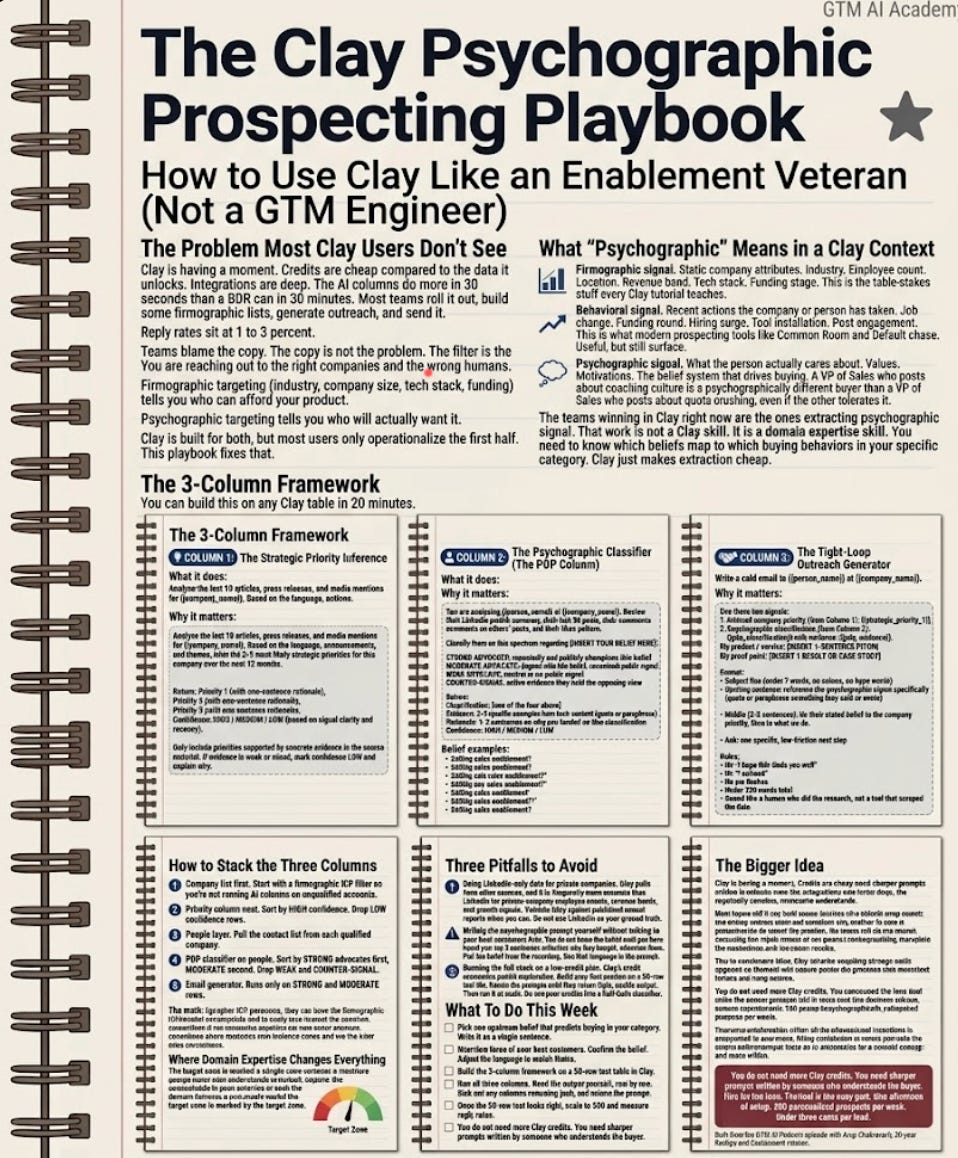
The Clay Psychographic Prospecting Playbook
The Problem Most Clay Users Don’t See
Clay is having a moment. Credits are cheap compared to the data it unlocks. Integrations are deep. The AI columns do more in 30 seconds than a BDR can in 30 minutes. Most teams roll it out, build some firmographic lists, generate outreach, and send it.
Reply rates sit at 1 to 3 percent. Teams blame the copy.
The copy is not the problem. The filter is the problem. You are reaching out to the right companies and the wrong humans.
Firmographic targeting (industry, company size, tech stack, funding) tells you who can afford your product. Psychographic targeting tells you who will actually want it. Clay is built for both, but most users only operationalize the first half.
This playbook fixes that.
What “Psychographic” Means in a Clay Context
Pull these three concepts apart.
Firmographic signal. Static company attributes. Industry. Employee count. Location. Revenue band. Tech stack. Funding stage. This is the table-stakes stuff every Clay tutorial teaches.
Behavioral signal. Recent actions the company or person has taken. Job change. Funding round. Hiring surge. Tool installation. Post engagement. This is what modern prospecting tools like Common Room and Default chase. Useful, but still surface.
Psychographic signal. What the person actually cares about. Values. Motivations. The belief system that drives buying. A VP of Sales who posts about coaching culture is a psychographically different buyer than a VP of Sales who posts about quota crushing, even if the firmographics are identical. One of them wants what you sell. The other tolerates it.
The teams winning in Clay right now are the ones extracting psychographic signal. That work is not a Clay skill. It is a domain expertise skill. You need to know which beliefs map to which buying behaviors in your specific category. Clay just makes extraction cheap.
The 3-Column Framework
You can build this on any Clay table in 20 minutes.
Column 1: The Strategic Priority Inference
What it does: Pulls the last 10 articles, press releases, or media mentions about the company, parses them, and returns a short list of inferred strategic priorities with a confidence score.
Why it matters: Outreach that references a real, recent priority gets opened. Generic outreach gets ignored. This column gives you a priority lens before you write a single word of copy.
Prompt template:
Analyze the last 10 articles, press releases, and media mentions for {{company_name}}.

Based on the language, announcements, and themes, infer the 2-3 most likely
strategic priorities for this company over the next 12 months.

Return:
- Priority 1 (with one-sentence rationale)
- Priority 2 (with one-sentence rationale)
- Priority 3 (with one-sentence rationale)
- Confidence: HIGH / MEDIUM / LOW (based on signal clarity and recency)

Only include priorities supported by concrete evidence in the source material.
If evidence is weak or mixed, mark confidence LOW and explain why.
Color code the confidence column green/amber/red and sort by green first. You will burn fewer credits on low-signal companies.
Column 2: The Psychographic Classifier (The PDP Column)
What it does: Reads a person’s LinkedIn profile, posts, comments, and likes and classifies them as a Strong / Moderate / Weak advocate for a specific belief that maps to your buying trigger.
Why it matters: This is the column that separates a smart Clay setup from a generic one. You pick the belief. Your domain expertise decides which belief is the right one.
Prompt template (swap the belief for your category):
You are analyzing {{person_name}} at {{company_name}}.

Review their LinkedIn profile summary, their last 30 posts, their comments on
others' posts, and their likes pattern.

Classify them on this spectrum regarding [INSERT YOUR BELIEF HERE]:
- STRONG ADVOCATE: repeatedly and publicly champions this belief
- MODERATE ADVOCATE: aligned with this belief, occasional public signal
- WEAK ADVOCATE: neutral or no public signal
- COUNTER-SIGNAL: active evidence they hold the opposing view

Return:
- Classification: [one of the four above]
- Evidence: 2-3 specific examples from their content (quote or paraphrase)
- Rationale: 1-2 sentences on why you landed on this classification
- Confidence: HIGH / MEDIUM / LOW
The domain-expertise step. Do not use this prompt without picking the belief first. Your belief should be the upstream conviction that predicts buying behavior in your category. Examples by function:
Selling sales enablement? “Advocate for professional development and coaching culture.”
Selling RevOps tooling? “Advocate for clean data and process rigor over speed.”
Selling customer success platforms? “Advocate for retention-led growth over top-of-funnel.”
Selling AI to marketing? “Advocate for first-party data and marketing science over paid-ads dependency.”
Selling security tooling? “Advocate for proactive risk culture over compliance-driven spending.”
Pick the belief your best customers hold. That belief, not their title, is your real ICP.
Column 3: The Tight-Loop Outreach Generator
What it does: Takes Column 1 (company priorities) and Column 2 (individual psychographic profile) and writes a first-draft outreach email that threads both signals into a single message.
Why it matters: Most Clay-generated email is bad because it pulls one signal (usually a recent funding round or a job change) and builds a whole message around it. The result is a sentence that works and four sentences of filler. This column forces the AI to thread two signals, which is the minimum for a message that reads human.
Prompt template:
Write a cold email to {{person_name}} at {{company_name}}.

Use these two signals:
1. Inferred company priority (from Column 1): {{strategic_priority_1}}
2. Psychographic classification (from Column 2): {{pdp_classification}} with
   evidence: {{pdp_evidence}}

My product / service: [INSERT 1-SENTENCE PITCH]
My proof point: [INSERT 1 RESULT OR CASE STUDY]

Format:
- Subject line (under 7 words, no colons, no hype words)
- Opening sentence: reference the psychographic signal specifically
  (quote or paraphrase something they said or wrote)
- Middle (2-3 sentences): tie their stated belief to the company priority,
  then to what we do
- Ask: one specific, low-friction next step

Rules:
- No "I hope this finds you well"
- No "I noticed"
- No em dashes
- Under 120 words total
- Sound like a human who did the research, not a tool that scraped the data
How to Stack the Three Columns
Build them in this order, in one table:
Company list first. Start with a firmographic ICP filter so you’re not running AI columns on unqualified accounts.
Priority column next. Sort by HIGH confidence. Drop LOW confidence rows.
People layer. Pull the contact list from each qualified company.
PDP classifier on people. Sort by STRONG advocates first, MODERATE second. Drop WEAK and COUNTER-SIGNAL.
Email generator. Runs only on STRONG and MODERATE rows.
The math: if your firmographic ICP produces 1,000 accounts, your high-confidence priority filter typically cuts that to 300 to 400. Your psychographic classifier cuts that to 60 to 120 actually-qualified humans. That is a far smaller list than most Clay users are used to sending. It is also the list that will actually reply.
Where Domain Expertise Changes Everything
A GTM engineer without a domain background will write the PDP prompt around the most obvious belief (”advocate for growth”). That prompt will classify 80% of LinkedIn users as Strong, which is useless.
A domain expert writes the prompt around the specific belief that is rare in the general population but common in their best customers. That prompt classifies 15-25% of leads as Strong, which is actionable.
Here is the test: if your psychographic classifier marks more than 40% of a broad list as Strong, your belief is too generic. Tighten it. If it marks fewer than 5% as Strong, it’s too narrow. Widen it. Target zone is 15 to 30%.
Three Pitfalls to Avoid
Pitfall 1: Using LinkedIn-only data for private companies. Clay pulls from other sources, and it is frequently more accurate than LinkedIn for private-company employee counts, revenue bands, and growth signals. Validate Clay against published annual reports when you can. Do not use LinkedIn as your ground truth.
Pitfall 2: Writing the psychographic prompt yourself without talking to your best customers first. You do not know the belief until you have heard your top 5 customers articulate why they bought. Interview them. Pull the belief from the recording. Use that language in the prompt.
Pitfall 3: Running the full stack on a low-credit plan. Clay’s credit economics punish exploration. Build your first version on a 50-row test list. Iterate the prompts until they return tight, usable output. Then run it at scale. Do not pour credits into a half-built classifier.
What To Do This Week
Pick one upstream belief that predicts buying in your category. Write it as a single sentence.
Interview three of your best customers. Confirm the belief. Adjust the language to match theirs.
Build the 3-column framework on a 50-row test table in Clay.
Run all three columns. Read the output yourself, row by row. Kick out any columns returning junk, and retune the prompt.
Once the 50-row test looks right, scale to 500 and measure reply rates.
You do not need more Clay credits. You need sharper prompts written by someone who understands the buyer.
The Bigger Idea
Clay is not the moat. The domain expertise pointed at Clay is the moat. If your Clay seat sits on a junior BDR with a templated prompt, you are paying for a spreadsheet with extra steps. If it sits on a vet who understands the psychographic patterns of your best buyers, you are running a prospecting system the competition cannot copy without a 10-year operator.
Hire for the lens. The tool is the easy part.