

We are back at it and today we are COOKIN! Cannot wait to let you dig into todays meaty material brought to you by GTM AI Podcast.
As a reminder, we have a TON of free options for you to subscribe to:
GTM AI podcast and newsletter with associated assets, apps, AI tools, etc
We also have Signal vs Noise which is more of a short and to the point update that is important for you to know.
On the paid side, we go DEEP on new AI tools, deep dives on how to use tech, and give you up to date education for GTM pros on how to use AI in your role. We would love for you to subscribe on any level that best for you.
Free or Paid, regardless of what you want to do, we will always shower you with as much valuable content as possible. Now lets get into it
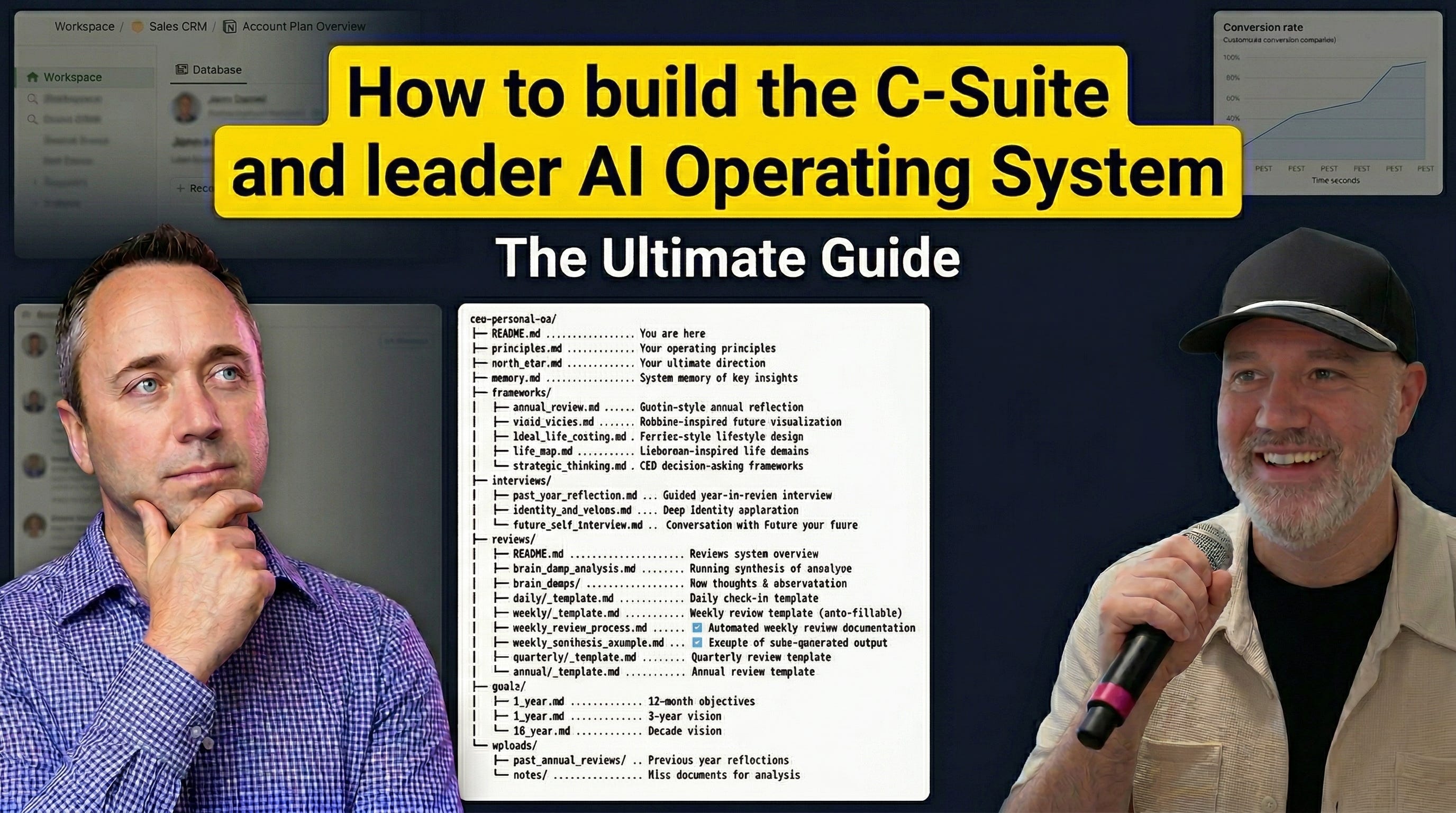
You can go to Youtube, Apple, Spotify as well as a whole other host of locations to hear the podcast or see the video interview.
Your CEO Doesn’t Have a Co-Pilot. This Guy Built One.
Ryan Staley grew a division from zero to $30M with four salespeople and no marketing budget. He’s taught 800+ CROs how to use AI to work less and sell more. And when he came on the GTM AI Podcast this week, he didn’t talk about any of that.
He screen-shared his entire CEO operating system. The one running his business right now. Built on Claude Code, Obsidian, and API connections to Fathom and HubSpot. No dev team. No custom software. Folders, files, and an LLM that knows more about his business than he does. His words, not mine.
Here’s what actually matters from this episode:
1) Your AI system is only as good as its foundation. Most people skip this part.
Ryan’s system doesn’t start with agents or automation. It starts with three things: principles (how the model thinks), a North Star (where the business is going), and memory (what the model has learned about you over time).
Here’s the pro tip that compounds: at the end of every strong session, ask the AI “How do you think we could work better next time? What did you learn from this session?” Then tell it to add those answers to memory.
Five seconds. Does it once, the model gets marginally better. Does it for three months, the model operates like a chief of staff who’s been with you for years.
Most people skip straight to “write me a LinkedIn post.” Then they wonder why the output is generic. Foundation first. Always.
2) He reverse-engineered his ICP from call transcripts in two minutes. Not two weeks.
Ryan connected Fathom’s API to his system. Then he told it: pull the last six months of closed deals, go through every transcript, reverse-engineer a new ICP based on how prospects actually talk, the language they use, the questions they ask, the problems they want solved. Give me a two-page briefing.
Two minutes. From untagged, transcript-level data across six months of sales conversations.
He then ran a second query: identify every epiphany moment clients have had over the last 12 months, categorize them by type (emotional breakthrough vs. new idea), and pull exact quotes. Five minutes for a full year of data.
The strategic shift here: your CRM holds surface data. Your transcripts hold the real intelligence. The teams connecting those two layers are building an information advantage their competitors can’t buy off the shelf.
3) His content system produces 10 posts from real client experiences. Not prompts.
Ryan types “weekly content” and gets 10 LinkedIn posts mapped to his exact writing style, pulled from actual client interactions, deal context, and transcript data. Not recycled frameworks. Not prompt-engineered slop. Stories from $300M and billion-dollar company engagements, automatically sanitized for confidentiality.
The part that caught my attention: he said the equivalent output would take five to six hours manually. And he’s now automating it so the system serves up content without him even asking.
Compare that to seven Clay tables and a content calendar. Same goal, fraction of the cost, and rooted in first-party intelligence instead of scraped data.
4) Pipeline reports that actually tell you what to do next.
One slash command. It pulls from HubSpot, layers in transcript context, cross-references notes in Google Drive, and outputs: high-priority accounts, next-best-action across everything, stack-ranked against your actual goals.
This isn’t a dashboard. It’s a decision engine. And it runs in seconds.
5) The monthly review that keeps you honest.
Ryan runs a monthly review through the system. It looks across everything: goals, daily check-ins, client interactions, brain dumps, pipeline activity. Then it tells him where he crushed it, where he’s behind, and what goals he’s neglecting entirely.
His quote: “It’s not all puppy dogs and ice cream. It’s also told me I’ve had a bad month.”
That’s the part most people miss. This isn’t a hype machine. It’s an accountability partner with perfect recall and zero ego. It tracks whether you’re actually doing the things you said mattered. And when you’re drifting, it says so.
He also mentioned the candidate scoring system. Upload resumes and interview transcripts, and the system stack-ranks candidates, flags red flags, and tells you exactly where to dig deeper. Every major decision in his business now runs through this architecture.
Why this matters:
Ryan said something that landed: “Executives get paid for the quality decisions they make. The big decisions. And that’s what this is helping.”
He’s not building a chatbot. He’s building a command center that makes him a better CEO. Better decisions, faster pattern recognition, zero context loss between sessions. And he’s doing it with tools that are available to you right now. Claude Code, Obsidian, a few API connections. No engineering team required.
What to do this week:
Pick one data source you’re not connecting to your AI system (note-taker transcripts, CRM, Google Drive). Connect it.
Start a memory system. Even if it’s just asking “what did you learn?” at the end of each session. Do it for two weeks and notice the difference.
Run one query against your transcript data that you’ve never been able to run before. ICP analysis, objection patterns, client epiphanies. See what the data says when you actually let an LLM read it.
Set up a daily check-in. Three questions, five minutes, end of day. Energy level, biggest win, biggest challenge. Let the patterns reveal themselves over time.
The gap between “using AI” and “operating with AI” is architectural. Ryan built the architecture. The question is whether you will.
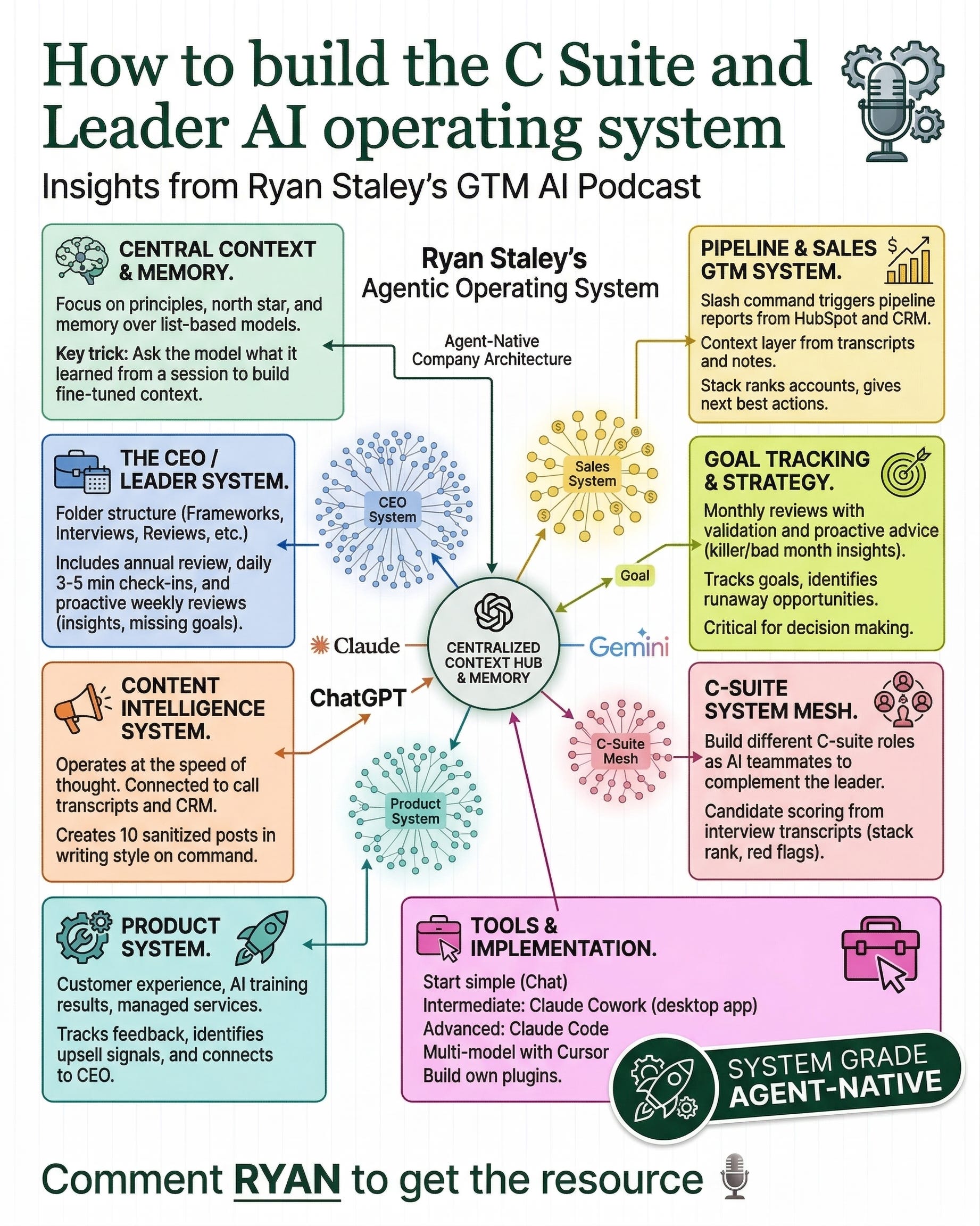
How to Build the C-Suite AI Operating System
Ryan Staley screen-shared the exact system he uses to run his entire company. Here’s how to build your own.
Ryan Staley grew a division from zero to $30M with four salespeople and no marketing budget. He’s taught 800+ CROs how to use AI. He works with companies from $20M to $20B on AI transformation.
When he came on the GTM AI Podcast, he didn’t give a pitch. He shared his screen and walked through the actual AI operating system running his business right now. The folder structure, the memory system, the review cadence, the intelligence queries, and the outputs it produces.
This guide breaks down every component of that system so you can build your own. Not theory. Not concepts. The actual build, file by file.
“I created an entire operating system for my business... it has the ability to look across every part of my business and let me operate at the speed of thought. Which has never been possible before.” — Ryan Staley
What This System Is (and Isn’t)
This is not another chatbot workflow. This is not “10 prompts to be more productive.”
This is a centralized AI operating system where every file, every framework, every piece of data connects to a single context layer. When you ask it a question, it doesn’t just respond from a generic model. It responds from YOUR principles, YOUR goals, YOUR call transcripts, YOUR brain dumps, YOUR accumulated memory across months of interaction.
Ryan described it as having a co-CEO sitting on his shoulder who has read every conversation, tracked every goal, and remembers every decision.
The difference between “using AI” and “operating with AI” is architectural. This is the architecture.
What You Need
To start (this weekend):
Claude Desktop (free), ChatGPT Plus, or Gemini — any model that can read files
A folder on your computer (Obsidian is ideal, but a plain folder works)
2-4 hours for the initial setup
To go deeper (week 2+):
Claude Code or Cursor — for API connections and automation
A GitHub account (free) — to store and version your system
Your call transcript tool (Fathom, Granola, Otter, Fireflies) — for data export
Your CRM (HubSpot, Salesforce) — for pipeline integration
To go full agentic (month 2+):
Claude Code with API connections to your note-taker, CRM, and Google Drive
Automated review schedules
Domain-specific agents (sales, content, product)
Ryan described the progression path:
Level 1: Chatbot (Claude.ai, ChatGPT) — basic conversation. Good for getting comfortable. No persistence, no file access.
Level 2: Claude Cowork (desktop app) — what Ryan called the “intermediate path.” Better memory, plugins, connectors. UI/UX that makes agentic capabilities accessible without a terminal. This is where most non-technical executives should start building this system.
Level 3: Claude Code / Cursor (terminal) — full agentic power. Connects to any API. Reads your entire file system. Executes code. Automates workflows. This is where Ryan runs his system. You can use any model through Cursor (Claude, GPT, Codex).
You don’t need Level 3 to start. You need Level 1 and a folder.
The Folder Structure
This is Ryan’s actual file index from the episode. Every file is plain markdown (text files with a .md extension). The AI reads the entire folder when you point it at the project.
ceo-personal-os/
│
├── README.md                        # System identity + instructions
│
├── foundation/
│   ├── principles.md                # Your operating principles
│   ├── north_star.md                # Your ultimate direction
│   └── memory.md                    # System memory of key insights
│
├── frameworks/
│   ├── annual_review.md             # Gusto-style annual reflection
│   ├── vivid_vision.md              # Robbins-inspired future visualization
│   ├── ideal_life_costing.md        # Ferris-style lifestyle design
│   ├── life_map.md                  # Lieberman-inspired life domains
│   └── strategic_thinking.md        # CEO decision-making frameworks
│
├── interviews/
│   ├── past_year_reflection.md      # Guided year-in-review interview
│   ├── identity_and_values.md       # Deep identity exploration
│   └── connection_interview.md      # Conversation with future you
│
├── reviews/
│   ├── README.md                    # Reviews system overview + automation
│   ├── brain_dump_analysis.md       # Running synthesis of all insights
│   ├── brain_dump.md                # Raw thoughts (as needed)
│   ├── daily_template.md            # Daily check-in template
│   ├── weekly_template.md           # Weekly review template
│   ├── monthly_template.md          # Monthly review template
│   ├── monthly_template_auto.md     # Automated monthly review
│   ├── weekly_synthesis_example.md  # Example of auto-generated output
│   └── annual_template.md           # Annual review template
│
├── goals/
│   ├── 1_year.md                    # 12-month objectives
│   ├── 3_year.md                    # 3-year targets
│   └── 10_year.md                   # Decade vision
│
├── uploads/
│   ├── post_annual_reviews/         # Previous year reflections
│   └── notes/                       # Misc documents for analysis
│
└── outputs/
    ├── reviews/                     # Generated review outputs
    ├── content/                     # Generated content batches
    └── reports/                     # Pipeline, ICP, analysis reports
Create this entire structure first, even if most files start empty. The structure itself tells the AI how the system is organized. When you point Claude Code, Cursor, or Cowork at this folder, it reads everything and reasons across all of it simultaneously.
That’s the leverage. Not a single prompt. An entire context architecture.
Layer 1: The Foundation
This is where 90% of people skip, and then they wonder why their AI outputs feel generic.
Ryan said it directly:
“Models work the best when you work at a principles level because it understands philosophically what you’re trying to do versus a memory list.”
Three files. These inform everything else in the system.
README.md — The System Identity
This is the first file the AI reads when it opens your project. It’s the job description for your AI chief of staff. Write it in plain language. Tell the model who you are, what this system is, and how you want it to behave.
What to include:
Who you are. Name, role, company, one sentence about what you do.
What this system is. “This is my personal AI operating system. It contains my principles, goals, frameworks, and accumulated context. Use everything in this system to give me the most informed, personalized response possible.”
How to behave. Be direct. Tell me what I need to hear. Check my goals before suggesting priorities. Don’t hedge. If I’m drifting from my goals, flag it.
Key context. Your market, your business model, your biggest current priority, how you think best.
System map. One-line descriptions of each folder so the AI knows what lives where.
This takes 10 minutes. It fundamentally changes how the AI interacts with you.
principles.md — Your Operating Philosophy
Not a mission statement. Not corporate values on a poster. These are the actual rules you use to make decisions. When the AI recommends a strategy, it checks it against your principles first.
The difference between an instruction and a principle: an instruction says “write me a cold email.” A principle says “I believe in earning attention, not demanding it. Outreach should provide value before asking for anything.” The instruction produces one email. The principle produces every email, every piece of content, and every strategic recommendation through the right lens.
How to build this file: Run an interview with your AI. Tell it to ask you one question at a time about how you make decisions, what you optimize for, what you refuse to compromise on, how you think about risk and speed and quality. After 10-15 questions, have it synthesize your answers into 5-8 operating principles, each written as a directive with a one-paragraph explanation.
This is the most important 30 minutes of the entire build.
north_star.md — Where You’re Going
This document grounds every recommendation in your actual direction. When Ryan asks for a pipeline report, the system stack-ranks accounts against his goals. When it does a weekly review, it checks his actions against his stated priorities. Without a North Star, the AI has no way to tell you if you’re drifting.
What to include: Your 3-year vision. This year’s top 3 priorities (ranked, with measurable targets). Quarterly focus. Strategic bets you’re making before the data proves it. Explicit trade-offs: what you’re choosing NOT to do, and why.
Run the same interview process. Have the AI ask you questions, then synthesize. Be specific. “Grow the business” is useless. “Reach $2M ARR by Q3 by closing 4 enterprise deals at $150K+ ACV” is useful.
memory.md — The Compound Layer
This is what turns a tool into a partner. Principles and North Star are relatively static (updated quarterly or annually). Memory updates every session.
“At the end of a long session that went really well, a great tip: you say, ‘How do you think we could work better next time? What did you learn from this session?’ And then say, ‘Add that to the memory.’ It helps get better and more fine tuned.” — Ryan Staley
Seed it with: Your communication preferences (bullets vs. prose, level of detail). How you make decisions. Your known blind spots. When you do your best thinking.
Then grow it: After every strong session, ask: “What did you learn about how I work? Be specific. Not ‘you prefer brevity’ but ‘you pushed back when I gave a 5-paragraph answer and asked me to cut it to 3 bullets, which tells me you prioritize density over completeness when reviewing options.’ Add it to memory.”
Five seconds per session. Over 30 days, the AI starts operating like a chief of staff who’s been with you for years. Over 3 months, it knows your patterns better than your business partner. That’s not hyperbole. That’s what Ryan described:
“These things know more about my business than probably I do even because they can look at all the data simultaneously.”
Layer 2: Frameworks
These are the thinking models your system uses to help you with big decisions, annual planning, and life design. Ryan’s system pulls from multiple proven sources. Each file teaches the AI how YOU think about these areas.
annual_review.md — Gusto-Style Annual Reflection
A structured year-in-review. Not “what went well / what didn’t” but a deep assessment across every domain: business scorecard (targets vs. actuals), top wins and why they mattered, top misses and what you’d do differently, relationship audit, health and energy trends, financial review, personal growth, and forward-looking priorities.
How to build it: Have the AI interview you through each domain at year-end. Push for specific numbers, dates, names, stories. Save the output. The AI uses this to calibrate its understanding of what a “good year” looks like for you.
vivid_vision.md — Robbins-Inspired Future Visualization
A detailed, present-tense description of your life 3 years from now, written as if it’s already happened. Tony Robbins’ method. Cover every domain: business (revenue, team, clients, daily rhythm), financial (income, net worth, freedom), relationships, health, lifestyle, impact, learning.
The key: be absurdly specific. Not “I have a successful business” but “I run a $5M ARR company with 8 team members, work 35 hours a week, and close my laptop by 5pm every day.”
When your AI has this document, it can evaluate whether your daily actions are moving you toward this vision or drifting away from it.
ideal_life_costing.md — Ferris-Style Lifestyle Design
Tim Ferris’ framework. Calculate the actual monthly cost of your ideal lifestyle (housing, transportation, food, health, travel, education, experiences, giving, savings), then work backwards to what your business needs to generate. This grounds your revenue targets in something real rather than arbitrary growth numbers.
Most people have never done this math. When you do, you often find you’re either overshooting (grinding for no reason) or undershooting (building a business that can’t fund the life you want).
life_map.md — Lieberman-Inspired Life Domains
A framework for mapping every domain of your life and scoring how you’re doing in each one. Prevents the “crushing it at work, everything else is on fire” problem. Your AI uses this to flag when your reviews show you’re neglecting non-work domains.
strategic_thinking.md — CEO Decision-Making Framework
How you evaluate big decisions: investments, hires, partnerships, pivots. Have the AI interview you with real examples from your recent decisions. Codify it into a framework: your decision principles (ranked), a rapid-decision template for reversible choices, a deep-decision template for irreversible ones, your known biases and the questions that counteract them, and kill criteria for when to stop investing in something.
When you ask the AI for a recommendation, it applies YOUR decision-making logic. Not generic pros and cons.
Layer 3: Interviews
You run these once (maybe annually). They produce the deepest context documents in the system. Think of them as giving your AI chief of staff a multi-hour onboarding about who you really are.
past_year_reflection.md — Guided Year-in-Review
Different from the annual review framework (which is a structured scorecard). This is a conversational interview. The AI asks you open-ended questions about your year: what was this year about, what surprised you most, what was your bravest decision, your lowest point, which relationships changed, what patterns kept showing up, what belief did you update.
The AI follows up on interesting answers. Goes where the energy is. Then synthesizes it into a narrative document that captures themes, patterns, and contradictions between what you said you valued and how you actually spent your time.
identity_and_values.md — Deep Identity Exploration
A multi-round interview that maps who you are at a level most people never articulate. Where your drive comes from. Your actual non-negotiable values (not aspirational ones). How your identity has changed. What you’re afraid of. What you’d build if you couldn’t fail. What you want to be remembered for.
The AI uses this to understand the “why” behind your decisions, not just the “what.”
connection_interview.md — Conversation With Future You
A guided visualization where the AI plays the role of your future self (5 years out, based on your vivid vision and north star) and you have a conversation. Future-you describes a typical day, and present-you asks questions.
The output captures: the identity shift required, the key decisions future-you made, the sacrifices, the daily habits that mattered, what future-you wishes present-you would stop doing immediately, and what future-you wants to give you permission to do.
This document creates emotional connection to where you’re building toward. It’s not a goal doc. It’s a motivation and clarity doc.
Layer 4: The Reviews System
This is the operating rhythm. The heartbeat. Ryan does daily check-ins, weekly reviews, monthly assessments, and annual planning, all through his AI system.
reviews/README.md
An operating manual for the review system. It tells the AI:
How each review level builds on the previous one (daily feeds weekly, weekly feeds monthly, monthly feeds annual)
When to automate and when to run manually
The rules: always check goals first, read the actual files (don’t summarize from memory), be honest, always end with forward-looking priorities
Daily Check-in (3-5 minutes)
Ryan’s replacement for journaling:
“Instead of journaling, I’ll do it. It’s kinda like my version of journaling.”
Five questions, asked one at a time:
Energy level today (1-10) and what drove it
Biggest win
Biggest challenge or frustration
Anything that surprised you or shifted your thinking
Anything unresolved that’s weighing on you
After your answers, the AI writes a 2-3 sentence pattern note connecting today to the last 7 days. Flags if a frustration is recurring. Notes if your activities misaligned with your quarterly priorities. Updates memory.
You can set a calendar reminder or just do it at end of day or before bed. “There’s days that I miss,” Ryan said. But the habit matters. Over time, it detects energy patterns, recurring blockers, and goal drift you can’t see in the moment.
Weekly Review
Ryan described this:
“I can say, ‘do my weekly review process,’ and it’ll pre-plan my next week, review my past week, and give me insights on things that I’m doing really good at, or goals I’m neglecting and missing.”
The weekly review reads all daily check-ins from the week plus any brain dumps. Output:
Week summary: Top 3 wins, top 3 challenges, energy trend
Goal scorecard: For each active goal, ahead / on track / behind / neglected. How many weeks dormant if neglected.
Pattern alert: What’s recurring, positive or negative
Brain dump synthesis: Themes from any brain dumps uploaded that week
Next week priorities: Top 3, ranked by impact, with specific actions
Blind spot check: Something you should be thinking about that you’re not
“It’s proactively giving me advice on blind spots that I have, or goals I’m tracking. It says if I’m ahead of goals too. It’s not just negative.” — Ryan Staley
Monthly Review
Ryan runs this on the 1st. It reads everything: all daily check-ins, all weekly reviews, brain dumps, transcripts, pipeline data, goals, memory.
“I said, ‘do a monthly review.’ It looked across all that context and gave me some really good insights. I’ve had a killer month and this is why. And it’s also told me I’ve had a bad month. It’s not puppy dogs and ice cream all the time.”
Output:
Honest verdict. Good month or bad month. Evidence first, not cheerleading.
Goal scorecard. Month-over-month trends. Accelerating, maintaining, or decelerating.
Top wins and top concerns. With specific evidence from the data.
Decision quality. Major decisions made, reasoning, and hindsight assessment.
Biggest unasked question. The strategic question you should be asking but aren’t.
Next month focus. Top 3 priorities, ranked.
Brain Dumps
“Sometimes I get my best ideas when I’m walking down the street or I just get out of the shower. So I’ll click on my phone, I got a Google Doc, and then I’ll just talk whatever I’m thinking. It doesn’t need to be structured.” — Ryan Staley
The workflow: Open phone. Open a Google Doc (or any notes app). Talk via voice-to-text. Don’t edit. Don’t structure. Just dump. Upload the text into your system weekly.
The AI processes it: extracts themes, connects ideas to goals, flags emotional signals (what you’re energized about, frustrated about, avoiding), identifies action candidates, and catches contradictions between what you said this week and what you said last week.
The brain_dump_analysis.md file maintains a running synthesis across ALL brain dumps over time. You can read it anytime and see the major themes of your thinking over months.
Layer 5: Goals
Three time horizons. Every review references these files.
1_year.md — 12-Month Objectives
For each goal: specific measurable target, deadline, why it matters (connection to your north star), leading indicators (what signals you’re on track before the lagging metric moves), current status (updated monthly), last update date.
Include quarterly checkpoints: what success looks like at end of each quarter.
Include trade-offs: what you’re explicitly NOT pursuing this year, and why.
“Goals are really hard to track because things are moving so fast and then update and align. And so this is what keeps me on track.” — Ryan Staley
3_year.md — 3-Year Targets
Business targets (revenue, team, clients, market position). Personal targets (lifestyle, financial, health, relationships). Strategic bets you’re making now that you believe pay off in 3 years. And the critical question: what has to be true about your business, skills, and market for these targets to happen?
10_year.md — Decade Vision
Written in present tense, narrative form. A day in your life 10 years from now. What you’ve built. Your impact. The numbers (net worth, income, time freedom). Your non-negotiables. What you’re willing to sacrifice to get there. What you’re not.
Layer 6: Data and Uploads
Your system is only as powerful as the data it can access. The foundation tells the AI who you are. The data layer shows it what you’re actually doing.
Call Transcripts
This is the highest-value data source. Ryan connected Fathom’s API so transcripts flow in automatically. For a simpler start: export weekly as text files, drop them into your uploads folder.
What this unlocks:
ICP reverse-engineered from how buyers actually talk (Ryan did this in 2 minutes from 6 months of untagged transcripts)
Client epiphanies extracted with exact quotes (5 minutes for 12 months of calls)
Objection patterns mapped with resolution data
Upsell and expansion signals detected across all client conversations
Content generated from real stories, automatically sanitized
“I said, ‘Identify every epiphany that my clients have had over the last 12 months and put those into categories.’ It did all that, pulled it up in five minutes with exact quotes and examples. That’s the shit that’s like, whoa.” — Ryan Staley
CRM Data
Ryan types “pipeline report” and gets HubSpot data layered with transcript context, Google Drive notes, and next-best-action recommendations stack-ranked against his goals.
Connect via read-only API key. Start with Deals and Contacts. The magic isn’t CRM data alone. It’s combining deal data with what the prospect actually said on the call.
Brain Dump Files
Already covered in the Reviews section. Phone, voice-to-text, upload weekly.
Notes and Documents
Proposals, strategy docs, board decks, research. Don’t dump everything. Pick the 10-20 documents that represent your current strategic reality. Update quarterly.
Layer 7: Outputs and the Agent Layer
Once the system has context (foundation + frameworks + interviews + reviews + goals + data), it produces intelligence that no generic AI can match.
What Ryan’s System Outputs
Pipeline intelligence. One slash command. HubSpot + transcripts + Google Drive + goals = high-priority accounts, next-best-action, stack-ranked against his quarterly targets. In seconds.
Weekly content. One command. 10 LinkedIn posts in his exact voice, rooted in actual client interactions at $300M+ companies, automatically sanitized. He said the manual equivalent takes 5-6 hours.
“People doing seven Clay tables to try and get that customization where you could just do that.” — Ryan Staley
ICP briefing. 2 minutes. From 6 months of untagged transcripts. The way prospects talk, the language they use, the questions they ask, the problems they want solved. A 2-3 page briefing doc.
Monthly honest review. Full assessment against goals, with evidence from daily check-ins, transcripts, pipeline, brain dumps. “You made a major leap this month” or “you had a bad month” with the data to back it up.
Blind spot detection. “Tell me three things I should be focused on that I’m not right now, and why.” Cross-references everything in the system to surface what you’re missing.
“There’s nothing else in the world that could give me that data that fast with that much context. Not even another person on my team.” — Ryan Staley
Candidate scoring. Upload resumes + interview transcripts. Stack-ranked, red flags identified, specific follow-up questions recommended.
The Agent Org Chart
Ryan mapped out specialized AI agents across his entire business. The CEO operating system (what we’re building here) is the hub. Additional agents branch from it:
Sales agent — reads pipeline + transcripts + goals. Produces deal intelligence.
Content agent — reads transcripts + brand voice + memory. Produces content in his exact style.
Product agent — reads client feedback + usage data. Surfaces feature priorities and upsell signals.
CMO, Chief Counsel, Chief HR Officer — Ryan has AI “executives” that complement him across every function.
Each agent reads from the same centralized context but focuses on a specific domain. That’s why he called it “interconnective tissue” rather than separate tools.
Build the CEO agent first. Add domain agents once the foundation is running and accumulating context.
The Build Sequence
You don’t need to build everything at once. This sequence gets you running fastest with real output at each stage.
Weekend 1: Foundation (2-4 hours)
Create the folder structure. Every folder from the diagram above, even if files are empty. 5 minutes.
Write README.md. System identity and instructions. 10 minutes.
Run the Principles interview. Have the AI ask you 10-15 questions about how you make decisions. Save as principles.md. 30 minutes. This is the most important step.
Run the North Star interview. Vision, priorities, targets, trade-offs. Save as north_star.md. 20 minutes.
Seed memory.md. Fill in what you already know about your working style. 5 minutes.
At this point you have the three foundation files. Your AI interactions are already fundamentally better than 95% of users.
Week 1: Start the Rhythm
Start daily check-ins. End of each day, 3-5 minutes. After each one, ask: “What did you learn? Add to memory.” This is the compound interest habit.
Set up goals/1_year.md. Specific targets, deadlines, leading indicators. Without this, reviews have nothing to score against. 20 minutes.
Run your first weekly review. Even with just 3-5 daily check-ins, it produces useful output. Gets dramatically better each week.
Start brain dumping. Phone, voice-to-text, 2-3 minutes, upload weekly.
Week 2: Connect Data
Connect your first data source. Start with call transcripts. Export from your note-taker, drop into the uploads folder.
Run your first intelligence query. ICP reverse-engineering, client epiphany extraction, or blind spot detection. Pick one. This is the moment that converts skeptics.
Weeks 3-4: Deepen the System
Run the deep interviews. Identity and Values, Past Year Reflection, Future Self Connection. One per session, 30-45 minutes each. These happen once a year but produce the deepest context in the system.
Build your frameworks. Decision-making framework, vivid vision, ideal life costing. One per session.
Connect additional data sources. CRM, Google Drive, more transcript history. Each source multiplies every other source.
Month 2+: Automate and Expand
Run your first monthly review. Now you have 4 weeks of dailies, 4 weeklies, brain dumps, and connected data. It will be substantive.
Start automating. Move from “I ask for the weekly review” to “it runs on schedule.” Ryan is at the point where content generates without him asking.
Build domain agents. Content, sales, product. Each reads from the centralized context. This is the agent org chart.
The Compounding Timeline
Day 1: You have principles and a north star. AI interactions feel different immediately.
Week 2: Daily check-ins accumulating. The AI knows your energy patterns and recurring frustrations.
Month 1: Connected data sources. First intelligence queries producing insights you’ve never had access to.
Month 3: 60+ debriefs, 12 weekly reviews, months of transcripts, memory that knows your preferences deeply.
Month 6: Automated outputs, domain agents, fully autonomous reviews. The system runs your business alongside you.
“Executives get paid for the quality decisions they make. The big decisions. And that’s what this is helping.” — Ryan Staley
The gap between “using AI” and “operating with AI” is architectural. This guide gives you the architecture. What you build with it is up to you.
Ryan Staley is the founder of Whale Boss, host of the Scale Up Show (top 1% global podcast), and works with C-suite executives at companies from $20M to $20B on AI transformation. Connect with him on LinkedIn.
Commenting “Ryan” for the AI source tools in this post