

We dig in again this week for a really fun GTM AI Podcast where Jonathan Moss who digs in deep with Scott Wueschinksi of GTMify and how they are automating and simplifying the GTM tech stack so that clients are getting insane results to the tune of $100M in pipeline in 3 months… crazy!
Today we will deep dive into his tech and overall strategy and then give you a playbook of how to use this yourself right now (or do it faster and better with Scott, up to you ;)
So below the podcast you will get the AI-Powered GTM Orchestration Playbook with sample emails and agent prompts.
Your GTM Stack Is a Frankenstein Monster. Here’s the Fix.
You can go to Youtube, Apple, Spotify as well as a whole other host of locations to hear the podcast or see the video interview.
He built $100M in qualified pipeline in 3 months using partnerships, intent data, and duct-taped automations. Now Scott (serial entrepreneur, 4x exit founder, co-founder of GTMify) has productized that playbook with AI.
In this episode, Scott demos three live builds:
An AI onboarding agent that builds your entire GTM foundation in under 5 minutes. ICP, buyer personas, use cases, competitive positioning, qualifying questions. What agencies charge $5K-10K and take weeks to produce.
A specialized agent architecture for outbound. Not one AI writing everything. Separate purpose-built agents for email (onsite intent vs. offsite intent), LinkedIn, SMS, WhatsApp, and even handwritten mail. All orchestrated from a single platform so you don’t need to be a GTM engineer or manage 30 tools.
A meeting follow-up automation that drafts your emails before your next call starts. Circle Back captures the transcript, n8n routes it, Anthropic extracts action items, and a draft email appears in Slack for you to approve or edit. No more 6 PM email scrambles.
Scott’s thesis: The modern GTM flywheel is content + intent + outbound, all running on a foundational AI layer. Most teams have the pieces but no orchestration. This episode shows you exactly how to build it.
Scott is a serial entrepreneur who has grown, scaled, and exited four businesses. He’s currently co-founder of GTMFI (gtmi.io) and part of the retail advisory group at Genpact. He’s also an instructor in the AI Go-To-Market School at Pavilion.
HIS THESIS
Most go-to-market teams are running 15-30 tools stitched together with duct tape and prayers. The dirty secret? They still can’t get a personalized email out the door without a “GTM engineer” who understands Clay tables and API dependencies. That’s not a tech stack. That’s a hostage situation.
Here’s what matters:
1) Your GTM foundation is broken because setup is painful, and everyone skips it.
Every outbound tool asks the same thing: define your ICP, populate your personas, articulate your value prop. Most teams half-ass this step or skip it entirely because it takes weeks of cross-functional meetings and expensive consultants. Scott automated the entire foundation in under 5 minutes.
How the onboarding agent works:
Enter your domain
An AI agent scrapes your website and processes the content
It generates: company summary, capabilities, challenges addressed, customer benefits, buyer personas with pain points and qualifying questions, use cases with business drivers, differentiated value, status quo comparison, and competitor intel
You review, edit, and confirm
The result is a complete go-to-market intelligence layer that feeds every campaign, every email, every LinkedIn message. What used to cost $5K-10K in agency fees and take 2-4 weeks now takes one onboarding session. Skip this step and your personalization is garbage. Nail it and every downstream touchpoint gets sharper.
2) Specialized agents beat general-purpose AI for outbound. Every time.
Scott doesn’t use one AI to write all outbound. He built purpose-specific agents for each channel and intent type. There’s an agent for email copy based on onsite intent. A different one for offsite intent. Another for LinkedIn. Another for SMS, WhatsApp, even handwritten mail scripts.
Why this matters: a prospect who visited your pricing page needs a fundamentally different message than one who downloaded a competitor comparison guide. One-size-fits-all prompting produces one-size-fits-nobody content.
The orchestration layer:
Four intent sources feeding signals (RB2B, Warmly, Vector, Kwanzoo for offsite)
Signals route to the right specialized agent based on channel + intent type
Content generates dynamically from the GTM intelligence foundation
Lemlist handles delivery (just the vehicle, not the brain)
Governance layer lets you choose: full autonomy or human-in-the-loop approval
The thesis: content drives intent, intent drives meaningful outbound, and meaningful outbound drives reply rates. Not the reverse. Most teams start with outbound and wonder why nobody responds.
3) Meeting follow-up is the silent pipeline killer. Scott automated it in Slack.
Back-to-back calls from 9 AM to 5 PM. By 6 PM, you can’t remember what you promised at 10 AM. Follow-ups slip to “tomorrow,” then Friday, then never. Scott built an automation that eliminates this entirely.
The workflow:
Circle Back records and transcribes the meeting
A webhook fires to n8n when the meeting ends
Anthropic extracts action items, context, and next steps
A draft email appears in Slack with approve/rewrite/add recipients options
Approved drafts land in Gmail ready to send or edit
No more end-of-day email scrambles. No more lost context. The heavy lifting is done before you finish your next call.
The tactical shift:
The modern GTM flywheel is content plus intent plus outbound, all running on a foundational AI layer. Most teams have the pieces but no orchestration. They have Clay but need an engineer. They have intent data but no automated response. They have content but it’s generic.
What to do this week:
Audit how long your GTM setup actually takes from zero to first personalized email sent. If it’s more than a day, your foundation is the bottleneck.
Count your tools. If you’re above 10 and still doing manual handoffs between them, you’re paying for complexity, not capability.
Pick one meeting follow-up from today and time how long it takes you manually. That’s the number you’re burning every single day.
Stop managing tools. Start orchestrating outcomes.
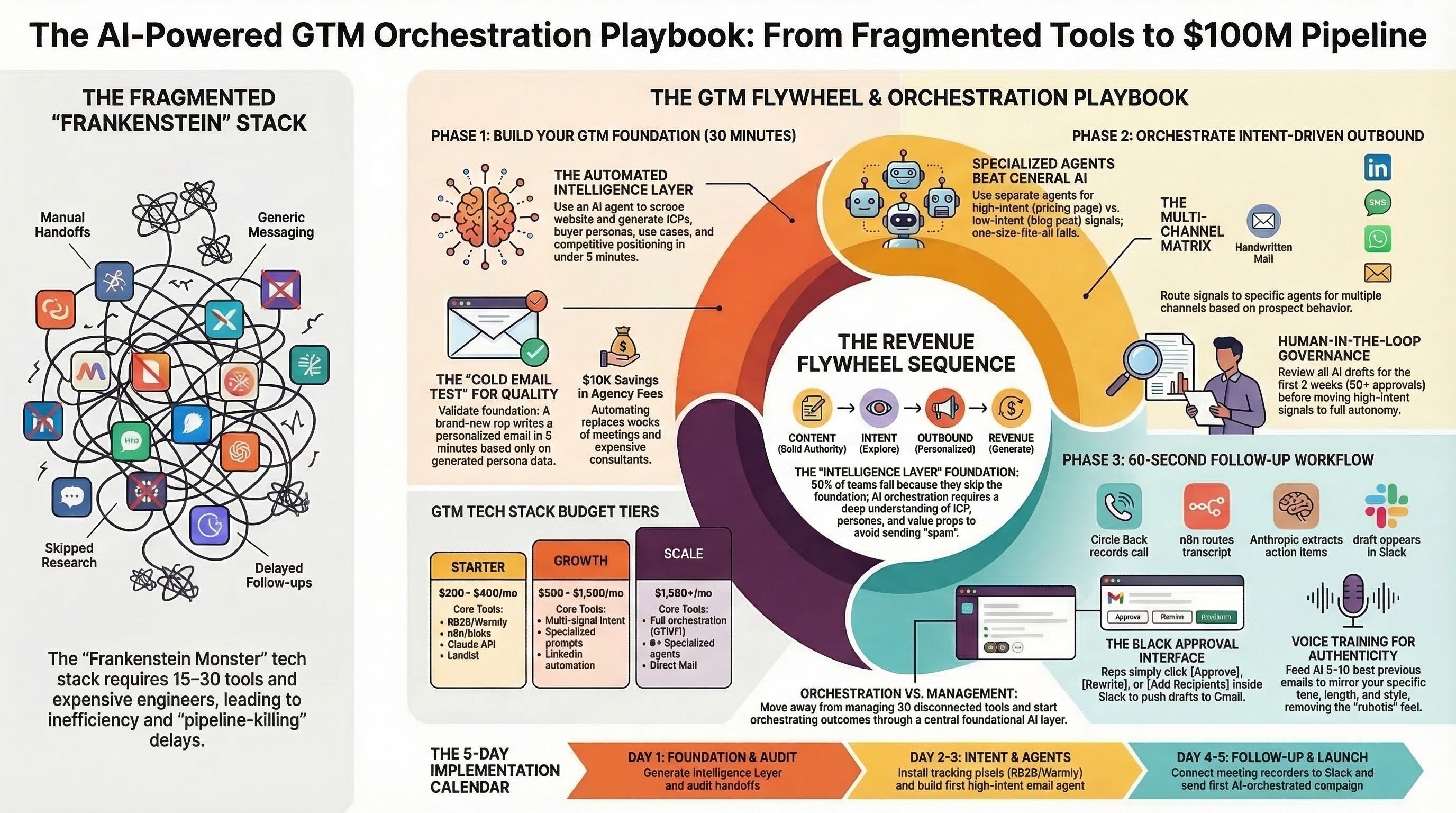
The AI-Powered GTM Orchestration Playbook
From Zero to First AI-Orchestrated Campaign in 5 Days
From the GTM AI Podcast | Based on Scott’s live build
Who This Is For
You’re a sales leader, growth leader, or marketing leader at a B2B company. You have a target account list. You know you need AI in your outbound motion. But you’re stuck between two bad options: (1) hire a GTM engineer to wire up Clay tables and API dependencies, or (2) keep doing it manually with 15-30 disconnected tools.
This playbook gives you a third option. Build an AI-orchestrated GTM system yourself in one week, using the exact architecture Scott demonstrated live on the GTM AI Podcast.
Scott has grown, scaled, and exited four businesses. At his last company, he built $100M in qualified pipeline in three months using partnerships and intent data stitched together with Zapier and willpower. He then productized that system at GTMFI, replacing the duct tape with purpose-built AI agents.
This is what he showed us. Step by step.
The Core Thesis: Why Most GTM Stacks Fail
Most teams build their outbound motion backwards. They start with sending emails, then wonder why reply rates sit below 2%.
The correct sequence is a flywheel:
CONTENT (builds authority, attracts visitors)
    ↓
INTENT (captures who's engaging and what they care about)
    ↓
OUTBOUND (reaches the right person with the right message at the right time)
    ↓
REVENUE
    ↓
(feeds back into content with proof points and case studies)
All three layers depend on a foundational intelligence layer underneath them. Without that foundation, content is generic, intent signals are noise, and outbound is spam.
Here’s the part nobody talks about: 90% of teams skip the foundation because building it takes weeks. Scott automated it in under 5 minutes. That’s where we start.
PHASE 1: Build Your GTM Intelligence Foundation
Time: 30 Minutes (Not 30 Days)
Why This Is the Most Important Step
Every outbound tool asks the same thing on day one: define your ICP, populate personas, articulate value props, map use cases. Most teams either:
Skip it (and their outbound sounds like everyone else’s)
Half-complete it (and their personalization is surface-level)
Outsource it to an agency for $5K-10K and wait 2-4 weeks
Scott’s system automates this entire step with an AI agent that scrapes your website, processes the content, and generates the complete intelligence layer. On the podcast, he entered a domain URL and had the following generated in under 5 minutes:
The Complete GTM Intelligence Layer (your checklist):
[ ] Company summary and capabilities - What you do, distilled to 2-3 paragraphs an AI can reference in every message it writes
[ ] Buyer personas (2-4) - Each including:
Primary responsibilities
Pain points (specific to their role, not generic)
Key objectives they’re measured on
Key concerns that block purchases
Common job titles (variations they actually use on LinkedIn)
Why they matter to you (what they control: budget, decision, influence)
Why you matter to them (the outcome you deliver to their specific role)
Qualifying questions (what to ask to determine fit)
Good fit signals / bad fit signals
[ ] Use cases (2-4) - Each including:
Summary of the problem solved
Scenarios where this use case applies
Desired outcomes with quantified targets
Business drivers (what’s pushing them to act now)
Customer segments this applies to (with firmographics)
[ ] Differentiated value statement - What you do that competitors don’t (not features, outcomes)
[ ] Status quo description - What happens if the buyer does nothing (this is your real competitor)
[ ] Competitor positioning - Who they’ll compare you to, your win themes against each, and where you lose
[ ] Reference customers - How they use you, how they benefit, and the proof points you can cite
How to Build This Without GTMFI
You don’t need Scott’s platform to build this layer. You need the right prompts and 30 minutes of focused work.
Step 1: Generate the raw intelligence
Copy your website’s key pages (homepage, about, product/solutions, pricing if public) into Claude or ChatGPT. Use this prompt:
You are a B2B go-to-market strategist. Based on the following website
content, generate a complete GTM intelligence document.

Include:
1. Company summary (2-3 paragraphs, written for an AI to reference
   when crafting outbound messages)
2. Top 3 buyer personas. For each: role title, responsibilities,
   pain points specific to their function, key objectives they're
   measured on, concerns that block purchases, qualifying questions
   to determine fit, and good/bad fit signals
3. Top 3 use cases. For each: problem summary, specific scenarios,
   desired outcomes with metrics, and business drivers
4. Differentiated value (outcomes, not features)
5. Status quo alternative (what happens if they do nothing)
6. Top 3 competitors with your win themes against each

Write in direct, tactical language. No fluff. Every statement should
be specific enough that a sales rep could use it in a cold email
without additional context.

[PASTE WEBSITE CONTENT HERE]
Step 2: Validate with the “cold email test”
Take each persona section and ask: “Can a brand-new sales rep read only this section and write a relevant, personalized cold email in under 5 minutes?” If the answer is no, the persona needs more specificity. Common gaps:
Pain points are too generic (”needs efficiency” vs. “spends 6 hours weekly manually qualifying leads that an AI scoring model handles in seconds”)
Qualifying questions are yes/no instead of diagnostic (”Do you use a CRM?” vs. “How are your reps currently prioritizing which accounts to work this week?”)
Value statements describe features instead of outcomes (”AI-powered analytics” vs. “cuts reporting time from 6 hours to 45 minutes weekly”)
Step 3: Store as your single source of truth
This document becomes the system prompt foundation for every AI agent you build. Every email agent, LinkedIn agent, and content generator pulls from this intelligence layer. Update it monthly based on closed-won/closed-lost analysis.
Failure Mode
If you skip this phase and jump to sending emails, your AI writes generic messages that sound like everyone else’s AI. The foundation is the multiplier. Without it, everything downstream is a 1x improvement at best. With it, you’re running on a 5-10x advantage because your AI actually knows your business, your buyers, and your value.
PHASE 2: Orchestrate Intent-Driven Outbound With Specialized Agents
Time: 2-3 Days to First Live Campaign
Why One AI Prompt for All Outbound Fails
Most teams using AI for outbound have one prompt template. It writes emails. It writes LinkedIn messages. It writes follow-ups. And everything sounds the same because it is the same.
Scott built a different architecture: purpose-specific agents for each combination of channel and intent signal. The logic is simple. A prospect who visited your pricing page three times this week needs a fundamentally different message than someone who read a blog post about a problem your product solves. One is ready to buy. The other is still learning. Same AI, same prompt, and you lose both.
The Agent Architecture Matrix
┌─────────────────────────┬──────────────┬──────────────────────────────────┐
│ INTENT SIGNAL           │ CHANNEL      │ AGENT BEHAVIOR                   │
├─────────────────────────┼──────────────┼──────────────────────────────────┤
│ Visited pricing page    │ Email        │ Solution-focused, ROI-led,       │
│ (high intent)           │              │ direct CTA for meeting           │
├─────────────────────────┼──────────────┼──────────────────────────────────┤
│ Read blog/resource      │ Email        │ Educational, value-add,          │
│ (medium intent)         │              │ offer related asset              │
├─────────────────────────┼──────────────┼──────────────────────────────────┤
│ Researched competitor   │ Email        │ Competitive differentiation,     │
│ (offsite intent)        │              │ win-theme messaging              │
├─────────────────────────┼──────────────┼──────────────────────────────────┤
│ Visited any page        │ LinkedIn     │ Short, conversational,           │
│ (onsite intent)         │              │ connection + context             │
├─────────────────────────┼──────────────┼──────────────────────────────────┤
│ High-value signal       │ Direct mail  │ Personalized handwritten-style   │
│ (enterprise target)     │              │ letter (expensive but effective)  │
├─────────────────────────┼──────────────┼──────────────────────────────────┤
│ Any signal              │ Cold call    │ Contextual script with           │
│                         │              │ intent-specific talking points   │
├─────────────────────────┼──────────────┼──────────────────────────────────┤
│ Any signal              │ SMS/WhatsApp │ Ultra-short, casual,             │
│                         │              │ one clear ask                    │
└─────────────────────────┴──────────────┴──────────────────────────────────┘
The Tech Stack (Budget Tiers)
Starter ($200-400/month):
Intent: RB2B or Warmly (onsite, pick one)
Orchestration: n8n (self-hosted, free) or Make ($9/month)
AI: Claude API or OpenAI API ($20-50/month at moderate volume)
Delivery: Lemlist or Instantly ($30-97/month)
CRM: Clarify AI, HubSpot Free, or Attio
Recording: Circle Back or Fathom (free tiers available)
Growth ($500-1,500/month):
Intent: RB2B + Warmly (onsite) + Kwanzoo (offsite)
Orchestration: n8n or Make (paid tier)
AI: Claude API with multiple specialized system prompts
Delivery: Lemlist (email) + LinkedIn automation
CRM: HubSpot Starter or Attio
Recording: Circle Back (paid)
Enrichment: Apollo, Clay (for data, not orchestration), or Clearbit
Scale ($1,500+/month or use GTMFI):
Intent: RB2B + Warmly + Vector + Kwanzoo (all four signals)
Orchestration: GTMFI or custom n8n with advanced routing
AI: Claude API with 6+ specialized agents
Delivery: Lemlist (multi-channel), direct mail provider
CRM: HubSpot Pro, Salesforce, or Attio
Full content engine with engagement tracking
How to Build Your First Specialized Agent
Start with the highest-value combination: email + pricing page visitors (onsite high intent).
Step 1: Set up intent capture
Install RB2B or Warmly on your website. Both take under 15 minutes. They’ll start identifying companies (and in some cases, individual visitors) who hit your pages. Focus the tracking pixel on your pricing page and product/solutions pages first.
Step 2: Create the webhook trigger
In n8n or Make, create a workflow triggered by a webhook from your intent tool. When a pricing page visit is detected, the webhook fires and passes the visitor data (company name, page visited, time on page) to your workflow.
Step 3: Write the specialized system prompt
This is where your GTM Intelligence Layer from Phase 1 becomes the engine. Here’s the template for a high-intent email agent:
You are a sales email writer for [YOUR COMPANY]. You write
personalized outbound emails to prospects who have visited our
pricing page, indicating high purchase intent.

COMPANY CONTEXT:
[Paste your GTM Intelligence Layer here: summary, capabilities,
differentiated value, status quo]

PROSPECT CONTEXT (provided dynamically):
- Company: {{company_name}}
- Industry: {{industry}}
- Company size: {{employee_count}}
- Page visited: {{page_url}}
- Visit frequency: {{visit_count}}

PERSONA MATCH:
[Paste the relevant persona from your intelligence layer]

RULES:
- Subject line: 6 words max, reference their specific situation
- Email body: 75 words max
- One clear CTA (meeting, not "learn more")
- Reference the problem you solve for their role, not your features
- Tone: direct, confident, zero fluff
- No "I hope this finds you well" or "I wanted to reach out"
- Open with their pain point or a relevant insight, not about you

OUTPUT FORMAT:
Subject: [subject line]
Body: [email body]
Step 4: Connect to your sending tool
Route the AI-generated email to Lemlist or Instantly via API. The sending tool handles deliverability, warm-up, and tracking. It’s the vehicle, not the brain.
Step 5: Set governance rules
This is critical and most teams skip it.
Week 1-2: Human-in-the-loop. Every AI-generated email gets reviewed before sending. You’re training your eye for what “good” looks like from your agents.
After 50+ approvals: Move high-intent signals (3+ pricing page visits) to auto-send. Keep human review for first-time visitors or ambiguous signals.
Suppression rules: If a prospect is already in an active sequence, don’t double-tap them. If they’ve replied to anything in the last 30 days, suppress new outreach.
Domain protection: Never send from your primary domain. Use lookalike domains (yourcompany.email, yourcompany.net). When a prospect replies and shows interest, hand off to your real domain for the sales conversation. The prospect never sees the switch.
Benchmarks to Track
Metric Bad Acceptable Good Great Reply rate (cold) <2% 2-5% 5-10% >10% Meeting book rate <0.5% 0.5-1.5% 1.5-3% >3% Positive reply % <30% 30-50% 50-70% >70% Emails to meeting >100 50-100 25-50 <25
If you’re below “Acceptable” after 2 weeks and 200+ sends, your problem is almost always in Phase 1 (foundation), not Phase 2 (delivery). Go back and sharpen your personas and value props before scaling volume.
Failure Mode
Scaling sends before your foundation is tight is the most expensive mistake in outbound. You burn through your addressable market with weak messaging, and those prospects are gone. You don’t get a second first impression. Fix the foundation first. Then scale.
PHASE 3: Automate Post-Meeting Follow-Up
Time: 2-3 Hours to Build, Saves 30-60 Minutes Daily
The Problem Nobody Measures
A rep has 6-10 calls per day. By 6 PM, they can’t remember what they committed to at 10 AM. Follow-ups go out late, vague, or not at all. The momentum from a great discovery call dies in 24 hours of silence.
Scott built an automation that kills this problem. Here’s the exact architecture.
The Workflow (What Scott Demoed Live)
Meeting ends
    ↓
Circle Back generates transcript + summary
    ↓
Webhook fires to n8n
    ↓
n8n passes transcript to Anthropic (Claude)
    ↓
Claude extracts: action items, next steps, key discussion
points, attendee context, tone of conversation
    ↓
Claude drafts follow-up email
    ↓
Draft appears in Slack with three buttons:
  [Approve] → Creates Gmail draft, ready to send
  [Rewrite] → Tell it what to change, loops back through Claude
  [Add Recipients] → Add CCs or forwards
    ↓
Approved email lands in Gmail as a draft
    ↓
You review for 30 seconds and hit send
How to Build This
Tools needed:
Circle Back ($0-20/month) for recording/transcription (alternatives: Fathom, Granola, Otter)
n8n (self-hosted free, or cloud $20/month) for orchestration (alternative: Make)
Claude API ($5-20/month at typical meeting volume) for extraction and drafting
Slack (free tier works) for the review interface
Gmail or Outlook for draft delivery
The extraction prompt (customize to your needs):
You are processing a meeting transcript to generate a follow-up
email. Extract the following:

1. KEY DISCUSSION POINTS: Top 3 topics discussed, with the
   prospect's specific concerns or interests noted
2. ACTION ITEMS: Every commitment made by either party, with
   owner and implied deadline
3. NEXT STEPS: What was agreed as the next interaction
4. PROSPECT SENTIMENT: Were they enthusiastic, skeptical,
   neutral? Note specific signals.
5. PERSONAL DETAILS: Any personal information shared (kids,
   hobbies, travel plans) that could be referenced naturally

Now draft a follow-up email.

RULES:
- Tone: [YOUR TONE - e.g., professional but warm, direct but
  not pushy]
- Open with a specific reference to something they said (not
  generic "thanks for your time")
- List 2-3 next steps with owners and dates
- Include one line about what YOU will do/send before the next
  touchpoint
- Close with a clear ask or confirmation
- Under 150 words
- No "I hope this email finds you well"
- No "per our conversation"
- No "please don't hesitate to reach out"

TRANSCRIPT:
{{transcript}}
The voice training step (this is what separates good from robotic):
After the first 5-10 emails, you’ll notice the AI’s tone doesn’t quite match yours. Fix this:
Collect 5-10 of your best actual sent follow-up emails
Add them to the system prompt as examples
Add the instruction: “Match the tone, length, and style of these example emails. Do not copy their content, but mirror how they open, close, and handle action items.”
This single step takes follow-ups from “clearly AI” to “clearly me, but faster.”
Failure Mode
The automation breaks when meetings are informal or off-topic. If you have a 30-minute call that’s 25 minutes of relationship building and 5 minutes of business, the AI will either write a weirdly formal email about the relationship stuff or miss the 5 minutes of substance. For these calls, train the prompt to recognize low-substance transcripts and flag them for manual follow-up instead of forcing a draft.
The 5-Day Implementation Calendar
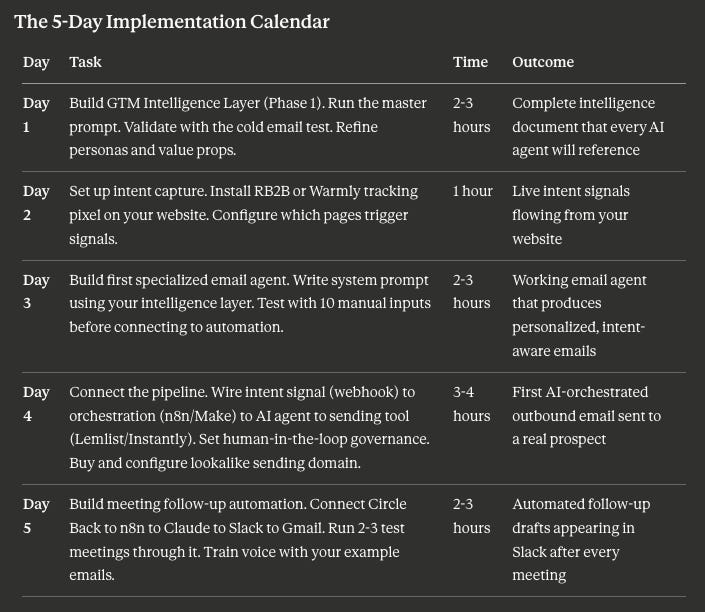
Total investment: 10-14 hours across one week.
What you’ve built: An AI-powered outbound system that captures intent, generates personalized multi-channel content, and automates follow-up. The same system that agencies charge $3K-8K/month to run for you.
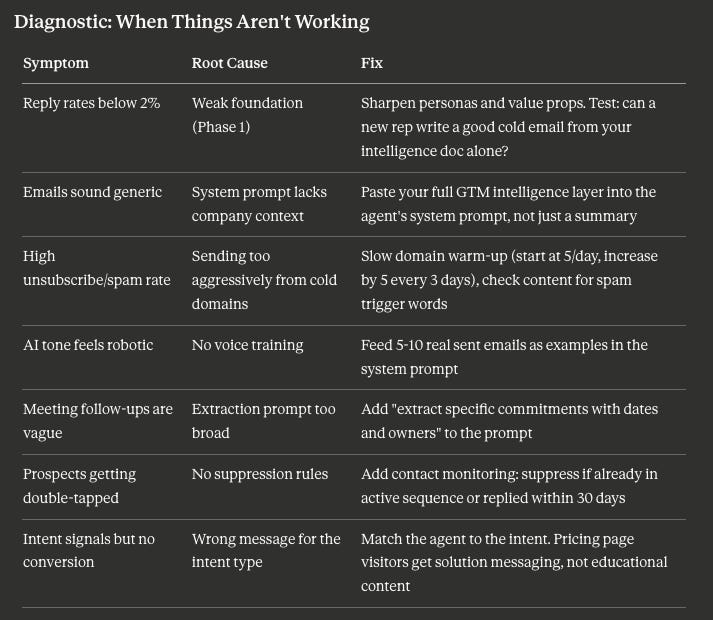
Diagnostic: When Things Aren’t Working
What You’re Not Building (and Why)
This playbook intentionally leaves out:
Content engine - Content drives intent, but building a full content strategy is a separate 30-day initiative. Start with outbound first, prove the model works, then invest in content to feed the top of the flywheel.
LinkedIn automation - Add this in week 2-3 after email is working. Same agent architecture, different channel-specific prompt.
Multi-touch sequences - Start with single-touch, high-intent emails. Add 3-step sequences after you’ve validated your messaging with positive replies.
CRM integration - Log deals manually for the first 2 weeks. Automate CRM updates after the pipeline starts flowing and you know what data matters.
Resist the urge to build everything at once. The teams that win are the ones that nail one channel first, prove it works, and then expand. The teams that lose try to launch email, LinkedIn, SMS, direct mail, and cold calling simultaneously with untested messaging.