

Welcome back everyone, we are so excited for this newsletter and podcast! Last week, Salesforce announced that it has signed a definitive agreement to acquire Momentum (where I work) so it was a bit busy for me so I missed last week.
However, we are going to start posting 2 podcasts and newsletter per week on Tuesdays and Thursdays. We had such a good response from the community with guests that we have a lot to get out and because AI changes so fast, I feel it is important to get the word out faster!
We have CHANGED FORMATS, which we are really excited about, where we have practitioners and GTM leaders/professionals showing off workflows that they are using right now to help you know what is working.
Last time we went over a really cool Claude Cowork setup with an AI pro.
The week before we had a guest going over how to use Claude Code to scrape podcasts for competitive research.
Week before we dove in with Mindstudio.ai for their business development and how they use AI agents.
Always looking for good stuff and today is no exception with Amelia Lerutte the Chief AI officer at SaaStr.com The code below is good until March 1!
SaaStr Annual is in May 12-14, 2026. If you want to see this stuff live, go to saastrannual.com. Go talk to Amelia AI on the site. She’ll give you a promo code for an extra discount!!!

3 Humans, 1 Dog, 20 Agents: How SaaStr Built a $5M Pipeline Machine
You can go to Youtube, Apple, Spotify as well as a whole other host of locations to hear the podcast or see the video interview.
SaaStr runs a 10,000-person conference, manages hundreds of sponsors, and operates a full go-to-market motion. Their headcount for all of it? Three humans and a dog. The rest is agents. Amelia LaRute, SaaStr’s Chief AI Officer (and the person Jason Lemkin calls “the AI Agent Whisperer”), sat down with me this week on the GTM AI Podcast and walked through the exact stack, the decision framework, and the results. What she shared should change how you think about building your GTM team in 2025.
Amelia LaRute went from running SaaStr’s demand gen and events to becoming their Chief AI Officer in August 2024. After SaaStr Annual last May, she locked herself in a room for 3 months and built out an AI agent stack that now runs most of the company’s go-to-market operations. SaaStr currently operates with 3 humans, 1 dog, and 20+ AI agents.
She walked through her full AI SDR funnel (splitting AgentForce and Artisan by data source), demoed a multi-agent Zapier workflow where one form fill triggers six agents in parallel, showed how Momentum feeds real-time sales intelligence to Slack, and live vibe-coded a sponsor portal from Claude to Replit on camera. The results: $5M in additional pipeline, $2.4M closed, deal volume doubled, win rate doubled, all in 8 months with a fraction of the headcount they had before.
Here are highlights from her own learnings:
1) Stop debating “which AI SDR.” Deploy two and split them by data source.
Most teams agonize over picking the one perfect AI SDR tool. Amelia runs both Salesforce AgentForce and Artisan simultaneously. Not because she likes paying for two platforms. Because each tool has a natural strength that maps to a different lead source.
Her split:
AgentForce handles leads already in Salesforce. Historical data, account context, previous interactions. All there. No migration needed. It follows up with existing contacts using everything you already know about them.
Artisan handles warm outbound and website visitors. People NOT in Salesforce yet. It pulls LinkedIn activity, recent posts, and real-time signals to personalize outreach without the baggage of old CRM data.
The principle: match the agent to where the data already lives. Don’t force one tool to do everything. That’s how you end up with generic outreach from a platform sitting on top of data it can’t actually use.
Amelia listed the lead sources most teams forget they already have before ever touching cold outbound: existing customers, free trial users, competitor customers, website visitors, churned accounts, event attendees. That’s six warm lead pools. Most companies skip straight to cold.
2) Agent-on-agent workflows are where the real compound value lives.
You need to steal this Zapier flow. Here’s what fires when someone fills a form on SaaStr Annual’s website:
Webhook catches the form submission
Contact pushed to Google Sheets (backup) and Salesforce simultaneously
Salesforce campaign auto-triggers an AgentForce email sequence
Clay enriches the contact with social data and company intel
Slack notification fires so Amelia or her AE can see it instantly
Gamma auto-generates a personalized presentation (pulling the prospect’s logo, brand colors, and relevant talking points)
Gmail draft created for the rep with the Gamma deck attached
That entire sequence fires in seconds. No human touches it until the rep decides whether to send the email. One form fill triggers six agents working in parallel. She called it “agent-on-agent action,” and she’s right. The real unlock isn’t one agent doing one job. It’s chaining agents where each one enriches the context for the next.
Her Zapier went from a couple hundred daily actions to over 1,000. That’s the volume of work being automated through agent handoffs alone.
3) The results aren’t theoretical. $5M pipeline, win rate doubled.
Eight months of deploying agents (starting June 2024, layering in a couple at a time):
$5M in additional pipeline attributed to agent-sourced or agent-assisted deals
$2.4M closed from that pipeline (50% close rate, which beats their old inbound rate)
Deal volume doubled because agents work 24/7 and can always book a meeting or give an initial answer
Win rate doubled because agents pre-qualify and gather context before the human ever gets on a call
That last point is the one most people miss. When Amelia’s AE David gets on a sales call, he already knows what the prospect told the agent, what they’re interested in, and what their objections are. The call skips small talk and goes straight to value. Amelia put it simply: “We have much better, more fruitful conversations because we already know what they want.”
The agents aren’t just generating pipeline. They’re making the humans who close deals significantly better at closing.
4) The 90/10 rule: when to buy an agent vs. build one.
Amelia’s decision framework is clean: 90% of the time, if a specialized agent exists and does the job, buy it. Momentum.io for RevOps intelligence. Qualified for inbound meeting booking. AgentForce for Salesforce-native follow-up.
The 10% you build? When no tool exists for your specific workflow. SaaStr vibe-coded a content review agent on Replit that grades speaking submissions for their conference. They fed it years of good and bad sessions, scoring criteria, and slot constraints. The AI is less biased than the human agency they previously used (which quit on them right before their biggest event).
She also created Amelia AI, a customer-facing clone that handles event questions, gives out promo codes, and books meetings. People interact with it so naturally that attendees walk up to her at events saying, “Oh, you’re REAL Amelia.”
Her workflow for building: start the spec in Claude (she uses Opus for complex work), copy the spec to Replit, use design mode for iteration, then flip to production when ready.
5) Managing 20+ agents is still messy. Here’s how she makes it work anyway.
Amelia was honest: managing 20 agents is too many for most teams. SaaStr is an edge case because they’re a community platform, an events company, and a media brand all at once.
But her management approach applies at any scale:
Everything pushes back to Salesforce (natively or through Zapier) so there’s one source of truth
Slack is the command center. Momentum call summaries, agent notifications, deal updates. She reads Momentum summaries before syncing with her AE, so she already knows the context of every deal
Contacts are the connective tissue. Without contacts in Salesforce, agents have no context to work with. The boring CRM hygiene work (auto-adding contacts from calls via Momentum) is what makes the entire agent stack functional
Don’t use agents where a Zap will do. Some people call everything an “agent.” If it’s a simple if-then automation, it’s a Zap. Save the agent label for things that reason, personalize, or make decisions
The biggest unlock she described wasn’t a tool. It was time. Before agents, she spent hours per day managing people, talking through drama, debating decisions. Now that agents handle the execution layer, she focuses on strategy and the work that actually moves revenue.
The tactical shift for your team:
Audit your lead sources before buying another AI SDR. List every warm pool (customers, trials, churned, website visitors, event attendees). Most teams are sitting on 6+ warm sources and jumping straight to cold
If you have two or more AI tools that overlap, don’t pick one. Split them by data source and match each to its natural strength
Build one agent-to-agent workflow this month. Start simple: form fill to CRM to enrichment to Slack notification. The compounding value comes from agents handing context to other agents
Use Momentum (or equivalent) to auto-capture call contacts and summaries. This is the data foundation that makes every other agent smarter
Amelia replaced 10 humans with 20 agents and got better results. Not because agents are better than people. Because agents don’t forget to update Salesforce, don’t skip follow-ups, and don’t need to debate the plan when January hits and the event is in May.
The competitive advantage window on multi-agent GTM stacks is open right now. Teams that build this infrastructure in 2025 will be running circles around teams still staffing up in 2026.
Amelia LaRute is the Chief AI Officer at SaaStr. She’s also a GTM AI 25 Award winner from Momentum.io. SaaStr Annual is in May 12-14, 2026. If you want to see this stuff live, go to saastrannual.com. Or just talk to Amelia AI on the site. She’ll give you a promo code.
For more breakdowns like this, join the GTM AI community at gtmaiacademy.com and subscribe to the GTM AI Podcast at gtmaipodcast.com.
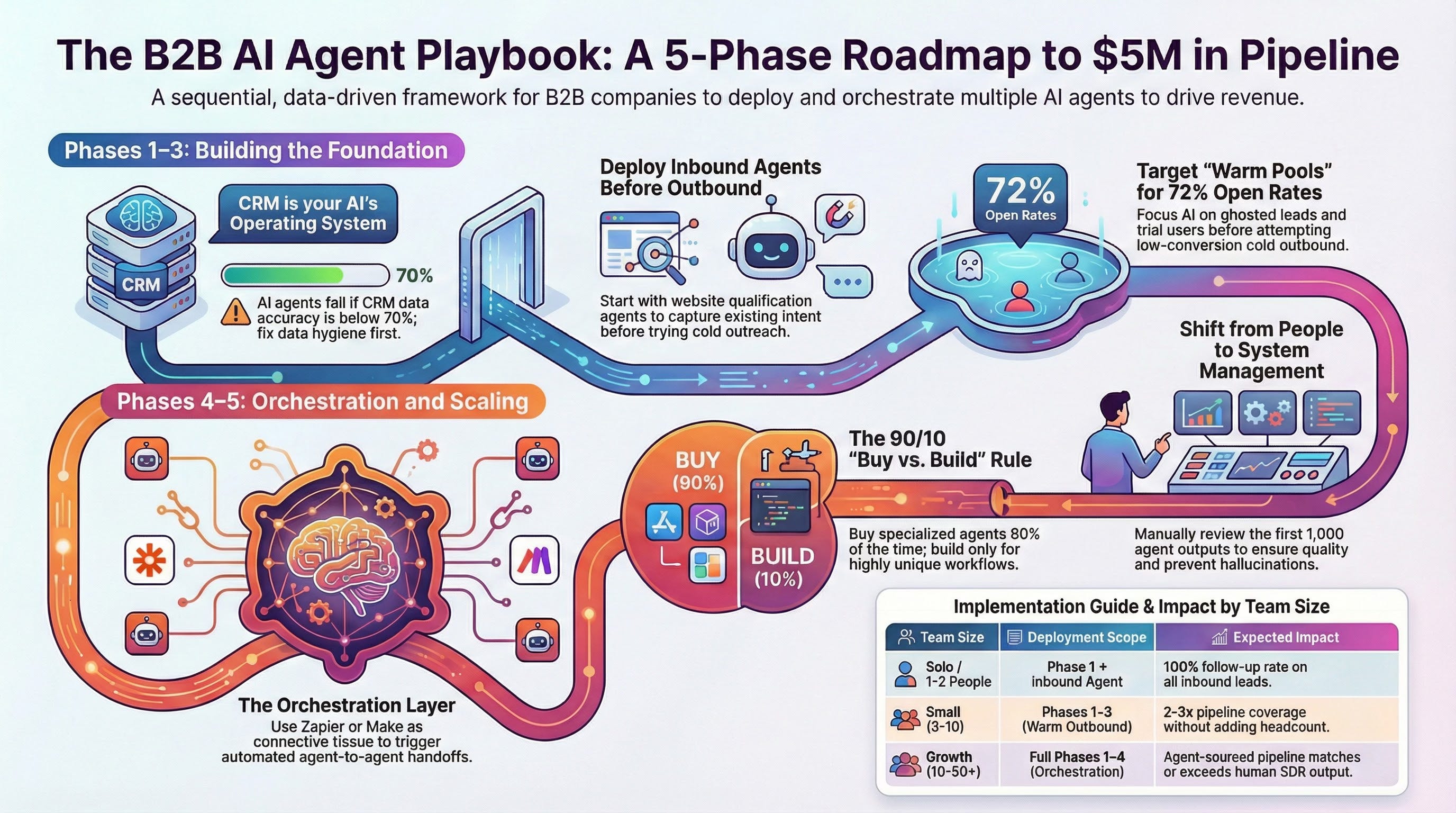
The B2B AI Agent Playbook: From Zero Agents to a Revenue Machine
How to deploy AI agents across your entire revenue cycle, regardless of team size
Based on real deployment data from SaaStr (3 humans, 20+ agents, $5M in AI-generated pipeline) and lessons from 10 months of multi-agent orchestration. To read more from Jason himself on their strategy, read his article this week.
Most companies deploy one AI agent, see results, and then bolt on four more without a plan. By agent five, things break. Duplicate outreach. Conflicting data. Agents stepping on each other. The left AI hand has no idea what the right AI hand is doing.
This playbook gives you the deployment sequence that actually works. Not theory. This is built from SaaStr’s real-world deployment of 20+ agents (which generated $4.8M in additional pipeline and doubled their win rate in 8 months) and the hard lessons they learned getting there.
You don’t need 20 agents. You need the right agents deployed in the right order with the right foundation underneath them.
Phase 1: Build the Foundation (Week 1-2)
Before you buy a single agent, fix this first.
Every AI agent you deploy will read from and write to your CRM. If the data in your CRM is garbage, your agents will produce garbage at scale. SaaStr learned this the hard way: they had reps who wouldn’t even log into Salesforce. When they deployed AI agents, stale data became an immediate crisis because the agents were making decisions based on records nobody had updated in months.
Your CRM is not a database anymore. It’s the operating system for your AI agents.
Whether you’re on Salesforce, HubSpot, or anything else, your agents need somewhere to live, share context, and coordinate. Without a central hub, you get chaos when you scale past two agents.
What to do this week:
Audit your CRM data. Open your CRM right now. Look at your last 50 accounts. How many have current contacts, accurate deal stages, and recent activity? If the answer is less than 70%, you have a data problem that will sabotage every agent you deploy.
Pick your hub. Salesforce, HubSpot, or whatever you already have. The specific tool matters less than the commitment to using it as the single source of truth for every agent. Don’t start a new system. Clean the one you have.
Set up auto-logging. Deploy a call intelligence tool (Momentum, Gong, etc.) that automatically captures every sales call and pushes structured data into your CRM. Call summaries. Next steps. Objections. Competitor mentions. No rep should ever manually log a call again. This is foundational because it creates the data your agents will use to make decisions.
Why this comes first:
SaaStr found roughly 1,000 warm, inbound, high-intent leads in Salesforce that had received zero human follow-up. Ever. They only discovered this when they deployed an AI agent (Agentforce) to re-engage those contacts. The agent worked because the data was finally there. If they’d tried this before fixing their data foundation, the agent would have sent irrelevant emails to outdated contacts.
The metric that matters: Every sales call auto-logged with structured data in your CRM within 5 minutes of the call ending. If this isn’t happening, nothing else in this playbook will work at full capacity.
Phase 2: Deploy Your First Two Agents (Week 2-4)
Start with inbound and call intelligence. Not outbound.
The number one mistake teams make: starting with an AI SDR for cold outbound. Cold outbound is the hardest use case for AI agents. It requires the most training, the most context, and produces the lowest initial ROI. Start where the intent already exists.
Agent #1: Inbound Qualification
Deploy an AI agent on your website that can answer prospect questions, qualify leads, and book meetings in real time. SaaStr’s inbound agent (built on Qualified) has handled hundreds of thousands of sessions and contributed over $1M in closed sponsorship revenue with another $2.5M in pipeline.
The key difference between this and a chatbot: your agent has full CRM context. It knows whether a visitor has attended your events before, their engagement history, their company info, their fit against your ICP. It’s not asking the same qualification questions a hundred times a day. It knows who it’s talking to.
What to configure:
Connect it to your CRM so it has full visitor context
Set qualification criteria based on your ICP
Build escalation rules for when it should hand off to a human
Create follow-up sequences for visitors who engage but don’t convert
There is no excuse in 2025 for a prospect to visit your website, show buying intent, and get routed to a discovery call that happens three days later. An AI should answer them in real time.
Agent #2: Call Intelligence + Auto-CRM
If you set up auto-logging in Phase 1, you already have this running. Now layer on the strategic use: make this data actionable for humans and other agents.
SaaStr’s approach: Momentum summaries push to a Slack channel. Before Amelia (their Chief AI Officer) syncs with her AE, she reads the Momentum summary and already knows the context of every deal. The AE walks into the meeting and she’s already thinking about next steps.
This changes every 1:1 from “tell me about your deals” to “I read the summaries, here’s what I think we should do about the Oracle deal.”
What to configure:
Call summaries to Slack (real-time, as calls end)
Auto-contact creation in CRM (no more manual entry)
AI signals for deal risk, competitor mentions, buying signals
Weekly digest of key themes across all calls
The metric that matters: Contacts auto-created in CRM from calls (SaaStr went from almost no new contacts being logged to 100% auto-capture). Response time on inbound inquiries (target: under 60 seconds with AI, not 3 days with a human).
Phase 3: Add AI SDRs for Warm Outbound (Week 4-8)
Work your warm pools before you ever touch cold.
Before you buy an AI SDR for cold outbound, list every warm lead source you already have:
Existing customers (upsell, cross-sell, expansion)
Free trial / freemium users (conversion)
Churned accounts (win-back)
Website visitors (identified through your inbound agent)
Event attendees (past and current)
Ghosted leads (inbound leads that got zero follow-up)
That’s six warm pools most teams skip straight past to cold outbound. Every one of these has higher intent and better conversion rates than cold.
SaaStr deployed Agentforce specifically for ghosted leads (warm contacts already in Salesforce with full history) and got a 72% open rate and 10%+ response rate. Compare that to cold email averages of 2-4% open rates. Warm context is a different category entirely.
The 90/10 Rule: Buy vs. Build
Amelia’s framework: 90% of the time, if a specialized agent exists and does the job, buy it. Don’t vibe-code your own RevOps agent when Momentum already has it nailed. Don’t build your own inbound bot when Qualified exists.
The 10% you build? When no tool exists for your specific workflow. SaaStr built a content review agent that grades speaking submissions for their conference. They built Amelia AI as a customer-facing clone. These were custom workflows no off-the-shelf tool could handle.
Before building anything, ask: “Does a tool already exist that does 80%+ of what I need?” If yes, buy it. If no, then build.
Splitting agents by data source
If you deploy more than one AI SDR (and you should consider it), don’t pick one and go all-in. Split them by where the data lives:
CRM-native agent (like Agentforce) for leads already in your CRM. It has the full relationship history. Let it use that context.
Outbound-focused agent (like Artisan, Monaco, etc.) for leads NOT in your CRM. Website visitors, LinkedIn-sourced prospects, event attendees not yet in the system. These agents are built to pull external signals (LinkedIn activity, company news, tech stack) and personalize without CRM history.
Match the agent to where the data already lives. Don’t force one tool to do everything.
What to configure:
Segment your warm lead pools into lists
Assign each pool to the agent best suited for it (CRM-native vs. external)
Set exclusion rules so agents don’t overlap (one prospect should not get emails from two different agents)
Budget 30 days to train each agent. Review the first 1,000 outputs manually. Every one. The agents that “don’t work” are the ones nobody trained.
The metric that matters: $4.8M in additional pipeline across SaaStr’s agent stack in 8 months. 50% close rate on agent-sourced deals (higher than their historical inbound rate). Your benchmark: agent-sourced pipeline should match or exceed your human SDR pipeline within 90 days.
Phase 4: Agent-to-Agent Orchestration (Week 8-12)
This is where the compound value lives.
One agent doing one job is useful. Six agents handing context to each other in sequence is a force multiplier. This is the phase where most teams either break through or break down.
SaaStr’s example workflow (one form fill triggers all of this):
Webhook catches the form submission
Contact pushed to Google Sheets (backup) and Salesforce simultaneously
Salesforce campaign auto-triggers an AgentForce email sequence
Clay enriches the contact with social data and company intel
Slack notification fires to the team
Gamma auto-generates a personalized presentation (pulling the prospect’s logo, brand colors, talking points)
Gmail draft created for the rep with the deck attached
That entire sequence fires in seconds. No human touches it until the rep decides to send the email.
How to orchestrate without chaos:
Zapier (or Make, or n8n) is the connective tissue. Every agent needs to push and pull data. Webhooks connect your vibe-coded tools. Native integrations connect your SaaS agents. The orchestration layer is what makes it all work.
SaaStr went from a couple hundred Zapier actions per day to over 1,000 once they connected their agent stack. That’s the volume of automated agent handoffs.
Rules to prevent agents from stepping on each other:
One prospect, one active agent at a time. Use your CRM to flag which agent “owns” a contact right now. Other agents check before engaging.
Escalation hierarchy. Define when an agent hands off to a human and when it hands off to another agent. Not everything needs human review.
Shared context layer. Every agent reads from and writes to the same CRM records. If your inbound agent qualifies someone, your SDR agent should see that qualification before reaching out. If your support agent logs a bad experience, your sales agent should know before sending a renewal email.
The metric that matters: Zapier/automation actions per day (measures orchestration volume). Zero duplicate outreach incidents per week (measures coordination). Time from first touch to booked meeting (measures the full-stack efficiency).
Phase 5: Optimize and Scale (Ongoing)
The management layer most teams skip.
You now have agents across inbound, outbound, call intelligence, and orchestration. Here’s how to keep it running:
Weekly agent review (30 minutes):
Pull a sample of 10-20 agent outputs from each active agent
Check for tone, accuracy, relevance, and any hallucinations
Review escalation logs (what did agents hand to humans?)
Check for overlap or conflicts between agents
Monthly pipeline attribution:
Tag pipeline by source: agent-generated, agent-assisted, human-only
Compare close rates across sources
Identify which agents are producing revenue and which are producing noise
The management mindset shift:
Amelia described this as the biggest unlock. Before agents, she spent hours per day managing people, talking through drama, debating plans. Now agents handle the execution layer. She focuses on strategy and revenue-moving work.
But agents need a different kind of management. Not motivation and 1:1s. Training data, exclusion rules, output quality reviews, and orchestration logic. The skill set shifts from people management to systems management.
The Quick-Start Matrix: What to Deploy by Team Size
Solo founder / 1-2 person team:
Phase 1 (CRM + auto-logging) + one inbound agent
Total cost: $200-500/month
Expected impact: Never miss an inbound lead. Auto-capture every call. 100% follow-up rate.
Small team (3-10 people):
Phases 1-3 (foundation + inbound + warm outbound SDR)
Total cost: $500-2,000/month
Expected impact: 2-3x pipeline coverage without adding headcount. Warm leads engaged within 60 seconds.
Growth team (10-50 people):
Full Phases 1-4 (add orchestration)
Total cost: $2,000-5,000/month
Expected impact: Agent-sourced pipeline matching or exceeding human SDR output. Deal velocity increase from shared context across agents.
Scaling team (50+ people):
All phases + custom-built agents for unique workflows
Total cost: $5,000+/month
Expected impact: Full AI-first revenue operation. Humans focused on closing and strategy. Agents handling qualification, enrichment, follow-up, and orchestration.
The 5 Rules That Make This Work
1. Your CRM is the operating system, not the database. Every agent reads from and writes to it. The CRM doesn’t become less important with AI agents. It becomes the most important piece of software you run.
2. Every agent takes 30 days to train. Review the first 1,000 outputs manually. Every single one. The agents that “don’t work” are the ones nobody trained. Budget for this or don’t bother deploying.
3. Warm before cold. Always. You have six warm lead pools you’re ignoring. Work those first. Cold outbound with AI gets you 2-4% open rates. Warm CRM outreach with full context gets you 72%.
4. Match agents to data sources. Don’t force one tool to do everything. CRM-native agents for CRM contacts. External signal agents for new prospects. Each has a natural strength.
5. The agents are only as smart as your data. Garbage in, garbage out. The irony of going AI-first is that it makes you more disciplined about data hygiene than you ever were as a human team. Because the agents depend on it.
This playbook is based on real deployment data from SaaStr’s Chief AI Officer Amelia LaRute (GTM AI Podcast) and Jason Lemkin’s account of deploying AI agents across the SaaStr business. For the full podcast episode, tools breakdown, and weekly GTM AI intelligence: gtmaipodcast.com